
ROG Xbox Ally X20 vs. Legion Go 2: Full Gaming Handheld Comparison
ROG Ally Xbox Ally X20 and Lenovo Legion Go 2 offer different gaming experiences through display size, controls, battery life, and flexibility.
Handheld by Shinji Okazaki on Oct 24, 2026
Gaming handhelds offer different ways to play PC games, even when they use similar hardware and cost about the same. The ROG Ally, Xbox Ally X20, and Lenovo Legion Go 2 target players who want to play PC games on the go. Still, their designs, controls, displays, battery capacities, and software experiences set them apart.
One focuses on an Xbox-style experience, while the other offers detachable controllers and multiple ways to use the device. ROG Ally, Xbox Ally X20, and Lenovo Legion Go 2 take different approaches to handheld gaming. One feels like an Xbox controller running Windows, while the other can turn into a tablet, a mouse, or a controller setup.
Design and Comfort
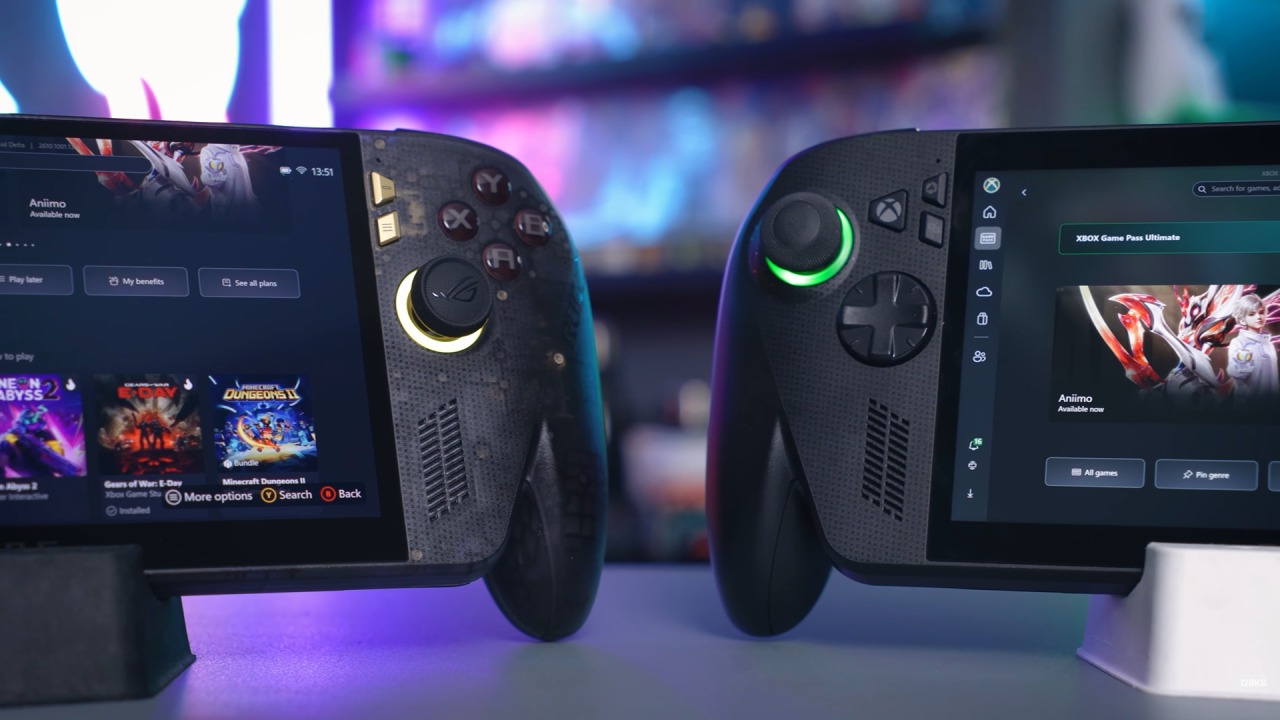
ROG Xbox Ally X20 celebrates 20 years of ROG, and its design reflects that. It features a translucent shell, gold accents, and a green Xbox button. However, the main feature is the grips. They're shaped like an Xbox controller, with a rubberized texture, and the whole device weighs 756g. It sits in your hand differently than most PC handhelds.
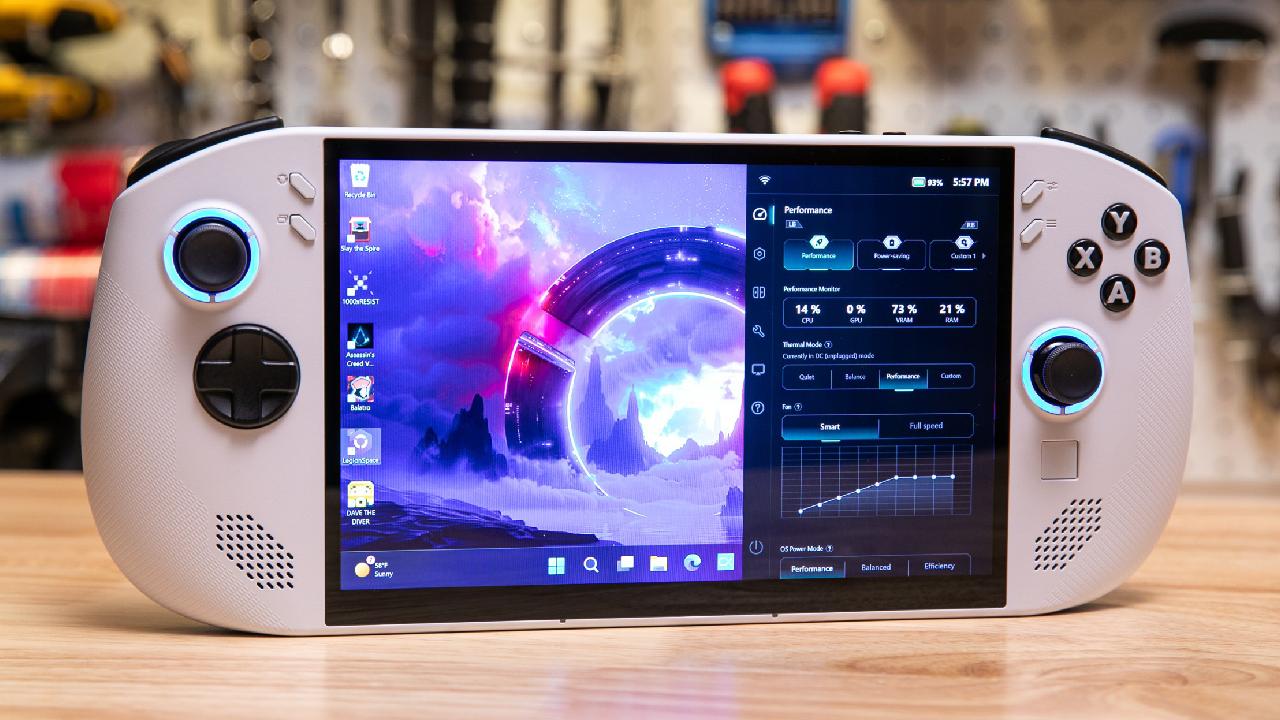
Legion Go 2 takes a different approach. It has an 8.8in screen between two controllers and weighs about 2lb, making it heavier than the original. That weight comes with its main feature. The controllers detach, and there's a built-in kickstand. You can flip the right controller into FPS mode or attach both controllers to a base for a console-like setup.
Both handhelds use OLED displays, but they target different needs. ROG Xbox Ally X20 has a 7.4in 1080p OLED panel with a 120hz refresh rate and FreeSync Premium Pro. ASUS rates the display at 600 nits in SDR and up to 1400 nits in HDR. It also supports Dolby Vision and has a Gorilla Glass Victus cover.
ROG Xbox Ally X20 is more comfortable, while the Legion Go 2 offers more versatility. If you play on the couch, in bed, or on a plane for long sessions, the X20 is the better option. If you like switching between modes, the Lenovo is a better fit.
Display Specifications and Image Quality
X20's display is compact, with a resolution that suits its size. Legion Go 2 offers a larger 8.8in OLED panel with 1920 x 1200 resolution, a 144Hz refresh rate, and VESA True Black 1000 certification. Its larger screen, higher refresh rate, and 16:10 aspect ratio work well for Windows. Legion Go 2 leads in screen size and refresh rate.
X20 has the edge in HDR brightness and pixel sharpness thanks to its smaller 1080p display. The performance comparison becomes interesting because the top-end versions of these handhelds use similar hardware. ROG Xbox Ally X20 packs an AMD Ryzen AI Z2 Extreme processor and Radeon 890M graphics, plus 24GB of LPDDR5X memory and a 1TB NVMe SSD.
That's the same hardware as the original ROG Ally X. ASUS hasn't changed the engine; it's upgraded the screen and controls. Legion Go 2 also offers the Z2 Extreme, but you can configure it with up to 32GB of RAM and up to 2TB of storage. It also comes in a base Z2 version, which costs less but offers lower performance.
In the same power mode, you can expect similar frame rates from the two handhelds when both use the Z2 Extreme. The main difference is the available headroom. Lenovo offers more memory and storage in the top configuration, which matters as games continue to grow. Legion Go 2 leads in configuration options, while both devices are roughly tied in raw performance with the Z2 Extreme.
Battery Capacity and Battery Life
Battery life remains a compromise for handheld gaming, and neither device solves the problem. ROG Xbox Ally X20 has an 80Wh battery, larger than the Legion Go 2's 74Wh battery. Lenovo also has a larger screen to power, plus a 144Hz panel that can draw more power at its higher refresh rate.
Both handhelds charge over USB-C, so you can use a power bank while traveling. ROG Ally X and the Xbox Ally X lead in battery capacity and expected endurance, though neither should last through a long flight at full power.
The controls are another area where these handhelds take different approaches. ROG Xbox Ally X20 uses TMR joysticks designed to reduce stick drift and improve accuracy. It also has Hall Effect triggers, impulse triggers for rumble, HD haptics, and a D-pad that switches between four-way and eight-way input for precise diagonal movements.
Neither handheld is the right choice for everyone because they're designed for different types of players.
Legion Go 2 leads in starting price and configuration options, while the ROG Ally Xbox Ally X20 keeps things simple with one hardware configuration. Buy the ROG Xbox Ally X20 if you want a handheld that focuses on comfort and a console-like experience. It has better grips, controller features, a larger battery, and an Xbox-style software experience.
If you mostly play on the go, hold your device for long sessions, and want minimal setup, the X20 is worth considering. Buy the Lenovo Legion Go 2 if you want a handheld that can do more than one thing. It has a larger screen, a higher refresh rate, detachable controllers, a built-in kickstand, and configuration options for memory and storage.
If you want a handheld that can also serve as a desktop gaming setup, the Legion Go 2 offers more ways to use it. For most people who want to play games comfortably, the ROG Xbox Ally X20 is the best choice. If you want flexibility and a larger display, the Legion Go 2 is the more versatile option.
Editor, NoobFeed
Latest Articles
No Data.