
MacBook Neo Review: Apple’s $600 Budget MacBook With A18 Pro
Apple introduces the MacBook Neo with A18 Pro chip, offering premium build quality and strong everyday performance at a $600 price point.
Hardware by Tanvir Kabbo on Mar 11, 2026
The dominant story in the tech world over the last few months has been the RAM crisis. AI data centers have pushed prices sky high, and PC manufacturers are either charging more, cutting corners, or both. Against that backdrop, Apple has introduced something unexpected: the MacBook Neo.
Priced at $600, it represents a very different kind of Mac. On paper, it looks almost too good to be true, especially considering Apple’s reputation for charging significant premiums for upgrades.
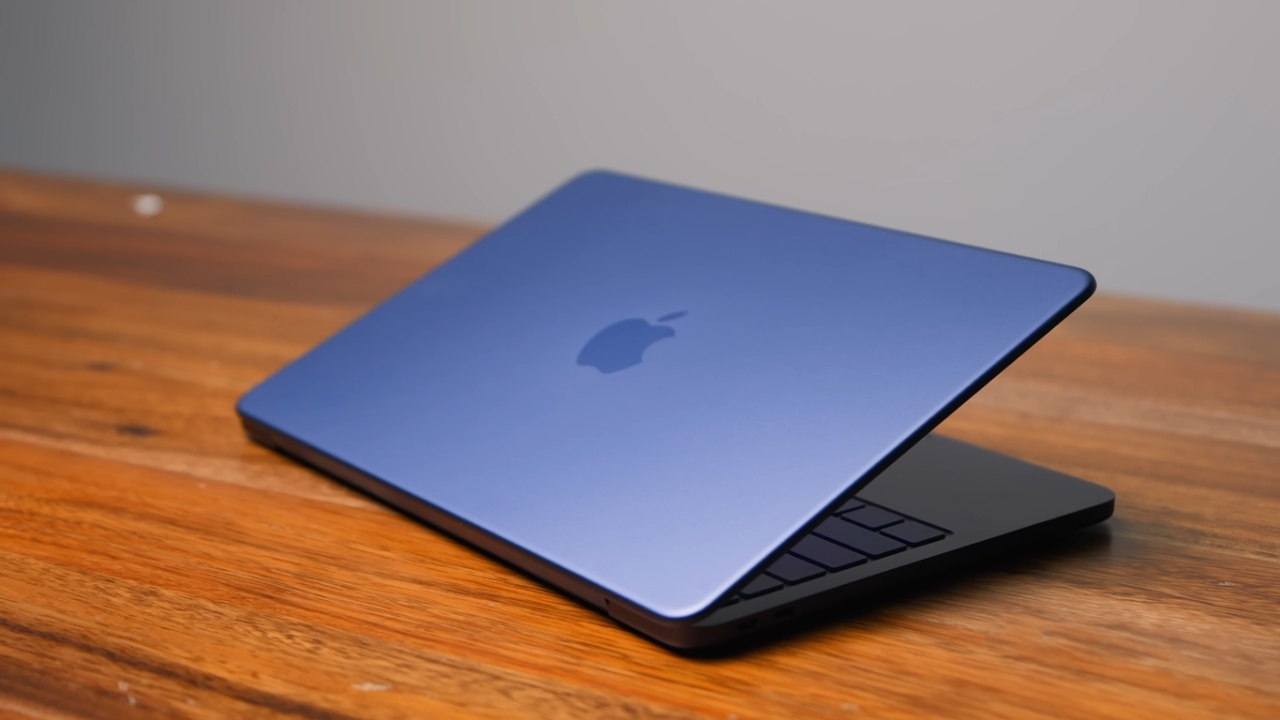
The MacBook Neo is powered by the A18 Pro, the same chip found in last year’s iPhone 16 Pro. The base model includes 8GB of RAM, 256GB of storage, and a 13in Retina display for $599. A $699 configuration doubles the storage to 512GB and adds Touch ID. Those are essentially the only two configurations available aside from choosing a color.
First Impressions and Design Choices
One of the biggest questions surrounding the Neo is what Apple had to sacrifice to reach the $600 price point. After spending some time with it, a few compromises become clear, but they are not as severe as expected.
The touchpad stands out as a pleasant surprise. Instead of using the Force Touch clickpad found on higher-end MacBooks, the Neo features a physically moving touchpad. Interestingly, the physical click gives it a satisfying feel that can even feel better than a Force Touch pad. There is an actual tactile click that makes interactions feel natural and responsive.
The keyboard feels slightly shallower, although that might be more perception than reality. The real difference is that it is not backlit. That is one of the most noticeable downsides compared with something like a MacBook Air.
The speakers are fairly decent. Even in a busy environment, they sound surprisingly good. They are side-firing, and the visible speaker slits along the sides contribute to a respectable audio experience.
Ports, Webcam, and Other Trade-Offs
Some compromises become clearer when examining the rest of the hardware. The webcam is passable but nothing special. It works, but it is not particularly impressive.
The port configuration is also unusual. The laptop includes two USB-C ports, but they are not equal. The front port supports USB3 and display output, while the second port is limited to USB2. That effectively turns the slower port into a charging port or a connection for simple accessories like a keyboard. Fortunately, the headphone jack remains intact.
The display is slightly smaller than the one found on a 13-inch MacBook Air, and the entire laptop itself is smaller as well. That actually feels like a positive change. The compact form factor makes the device easier to carry and gives it a more portable feel.
Build Quality Compared With Budget Windows Laptops
To understand the Neo’s position in the market, it helps to compare it with other laptops in the same price category. One example is the Lenovo IdeaPad Slim 3X, which recently won a competition among several Windows laptops priced at $500 or less.
The IdeaPad Slim 3X is a solid machine, but the difference in build quality becomes obvious when placed side by side with the Neo. While the Lenovo includes some aluminum elements, most of its construction is plastic. It feels like a typical $500 laptop.
In contrast, the MacBook Neo is made entirely from aluminum. It feels almost identical to laptops that cost twice as much. There is very little flex, and the overall construction feels durable and premium. MacBooks are well known for longevity, and the Neo continues that tradition.
The Neo also offers a brighter display with higher resolution and significantly better color accuracy. Viewing angles are noticeably superior as well.
However, the Lenovo keyboard has advantages. It offers more travel and includes backlighting, which the Neo lacks. The Lenovo also uses a traditional diving-board style trackpad that only clicks at the bottom. Meanwhile, the MacBook’s touchpad can be clicked from any corner thanks to its dual flexure design.
.jpg)
Performance and Benchmark Comparisons
Interestingly, benchmarks suggest a different story from the physical experience. In multi-core performance, the Snapdragon X processor inside the IdeaPad Slim 3X actually outperforms the Neo. The Lenovo also features a significantly faster SSD, with read speeds more than three times faster.
The IdeaPad also includes 16GB of RAM, which is something many users wish were available on the Neo.
However, single-core performance tells another story. The A18 Pro is significantly faster in single-core tasks, which has a major impact on everyday performance. Opening apps, browsing the web, and general responsiveness all benefit from strong single-core performance.
That gap makes the Neo feel much faster in typical daily use, even if benchmarks suggest otherwise in certain categories.
Ecosystem Advantages
Operating system differences also play an important role. The IdeaPad runs Windows, which can be either an advantage or a drawback depending on the user’s needs.
Apple clearly designed the Neo as an entry point into its ecosystem. The laptop integrates seamlessly with iPhone, AirPods, and iCloud. Features like device syncing and cross-platform continuity are central to the experience.
Bringing more users into that ecosystem appears to be a key part of Apple’s strategy.
Comparing the Neo With the M1 MacBook Air
The Neo does not exist in isolation. Since 2024, Apple has continued selling the M1 MacBook Air at a lower price through retail channels. That laptop originally launched in 2020 but remained available for around $700 and occasionally dropped to $600–$650 during sales.
The M1 Air features similar specifications, including 8GB of RAM and 256GB of storage. Performance between the M1 chip and the A18 Pro is actually fairly close.
The Neo has a few advantages. Its single-core performance is stronger, making everyday tasks feel slightly faster. It is also smaller and lighter, supports faster WiFi6E, and is five years newer, which means longer software support.
However, the M1 Air still holds some advantages. Its SSD is nearly twice as fast as the one in the Neo.
RAM Limitations and SSD Swap Behavior
Both the Neo and the M1 Air include only 8GB of RAM. macOS manages memory efficiently, but once that limit is exceeded, the system relies on the SSD as swap memory.
During normal use such as browsing and running several applications, the Neo handles the 8GB limit without issues. But under heavier workloads, the slower SSD can become a bottleneck.
For example, large tasks like downloading, unzipping, and transferring hundreds of gigabytes of data can saturate the SSD. When that happens, the system may briefly pause while macOS swaps data between the SSD and RAM.
That situation is unlikely during everyday use, but it highlights the limitations of the slower storage.
Additional Hardware Differences
The M1 MacBook Air also includes several small advantages. It features a backlit keyboard and two full Thunderbolt3 ports instead of the Neo’s USB3 and USB2 configuration. Modern MacBook Air models add MagSafe charging as well, which is absent on the Neo.
Despite those differences, the overall experience remains remarkably similar.
Real-World Usage Experience
After nearly a week of use, the most striking takeaway is how close the Neo feels to a MacBook Air. In everyday tasks, the performance is excellent. Outside of benchmarks, the system feels quick and responsive.
The display lacks features like the P3 color gamut and TrueTone, but in everyday use the difference is difficult to notice. The screen still looks sharp and vibrant.
Interestingly, the Neo does not include the notch found on newer MacBook models. That absence provides slightly more room in the menu bar and gives the screen a cleaner appearance.
Battery life averages around 8–9hours, which is respectable for a laptop in this price range.
Apple’s Strategy Behind the Neo
Apple’s scale and vertical integration play a major role in making the Neo possible. Because Apple designs its own chips, it can repurpose hardware like the A18 Pro at a lower cost compared with PC manufacturers purchasing processors from AMD, Intel, or Qualcomm.
The A18 Pro was produced in massive quantities for the iPhone lineup. Using it in a laptop significantly reduces manufacturing costs.
Apple also controls macOS, allowing the company to optimize the operating system around 8GB of RAM in ways that Windows manufacturers cannot easily replicate.
.jpg)
Expanding the Apple Product Ecosystem
The Neo also reflects a broader strategic shift. Apple appears to be expanding its lineup in both directions.
On the affordable side, products like the MacBook Neo, the iPhone 17e, and the $600 Mac Mini are designed to attract new users into the ecosystem. Even the base iPad has followed a similar strategy for years.
On the higher end, rumors suggest that Apple may introduce more premium devices such as a MacBook Ultra or foldable iPhone models.
Having products across multiple price ranges allows Apple to grow its ecosystem. Once users enter that ecosystem, services like the App Store and iCloud generate long-term revenue.
Final Thoughts
The MacBook Neo is not perfect. The 8GB RAM limit could become restrictive over time. The SSD is slower than ideal. The keyboard doesn't have backlighting, there aren't many ports to choose from, and the battery is smaller than those on more expensive models.
Even with such trade-offs, it's hard to dismiss the overall worth. The Neo gives you a laptop that looks and feels like one that costs a lot more for $600 to $700.
If you are thinking about getting a MacBook Air for a larger price, the Neo is a really good option. The Neo is one of the best laptops under $1000 right now, unless you need Windows compatibility or a notebook that can handle heavy gaming.
Also, check our other hardware articles:
- AMD Ryzen 9 9950X3D Review: Setting The Standard For 2025 Gaming CPU
- Amazon Luna 2025 Review: Is Prime Gaming's Cloud Service Your Go-To For Casual Fun?
- AMD RX 9070 XT Review: AMD's RDNA 4 Champion for 1440p Gaming
- GeForce Now Ultimate: Ditching Your Gaming PC For Cloud RTX 4080 Power?
- NVIDIA GeForce RTX 5080 Review (2025): Still A 4K Gaming Powerhouse?
- Intel Core Ultra 9 285K Review And Performance Breakdown (2025)
- AMD Ryzen 7 9800X3D Review: 3D V-Cache Goes God Mode with Stunning Gaming Performance
- Intel Core Ultra 9 285K vs AMD Ryzen 7 9800X3D: In-Depth Gaming Performance and Benchmark Comparison
- NVIDIA GeForce RTX 5080 Super Performance In Cyberpunk 2077: Path Tracing & DLSS 4.0 Tested
- AMD Radeon RX 9070 XT In Cyberpunk 2077: Ray Tracing & FSR 4.0 Tested
- Intel Arc B580 Review: The $250 GPU Revolutionizing 1440p Gaming
- Intel Arc B570 Vs. B580: Value, Specs, And Real-World Gaming Performance
- RTX 5090 Laptop Vs. M4 Max MacBook Pro: Ultimate Raw Performance Vs. Battery Endurance
- Intel Arc b580 Vs. RTX 4060: Game Performance And Value Analysis
- RTX5090 Hell Is Us Demo 4K Ultra Benchmark: DLSS Vs. Native Performance Guide
- NVIDIA RTX 5070 Review: Mid-Range Muscle or Marketing Hype?
- Nintendo Switch 2 Review: Handheld Performance, Features & Value Breakdown
- RTX 5070 Ti Review: Performance, Thermals & Power Efficiency Tested
- Samsung Odyssey OLED G81SF Review 2025: Ultimate 32-Inch QD-OLED Gaming Monitor
- AMD RX 9070 Performance Review: Thermals, Clocks, and Real-World FPS
- AMD Ryzen 5 7600 Review: Best Budget Gaming CPU of 2025?
- AMD Radeon RX 7800 XT Review: RDNA 3 Power For Midrange Gaming
- Asus ROG RTX 5090 Astral OC Vs. Founders Edition: The 4K Gaming Benchmark
Senior Editor, NoobFeed
Gaming Hardware Updates
No Data.