
Pokémon Legends: Z-A Guide | How to Use Colorful Screws
Here's a guide on how to use Colorful Screws in Pokémon Legends: Z-A.
Game Guide by Ragib Rawnak on Nov 03, 2025
In Pokémon Legends: Z-A, you can use Colorful Screws to enhance multiple aspects of your gameplay, including experience gain, prize money, health, catch rate, and the number of Mega Shards obtained.
Finding Colorful Screws
Throughout the world of Pokémon Legends: Z-A, you will encounter Colorful Screws, which appear as purple Pokéballs placed on scaffolding and elevated platforms. You should collect them whenever possible, as they serve as a special form of currency in Pokémon Legends: Z-A.
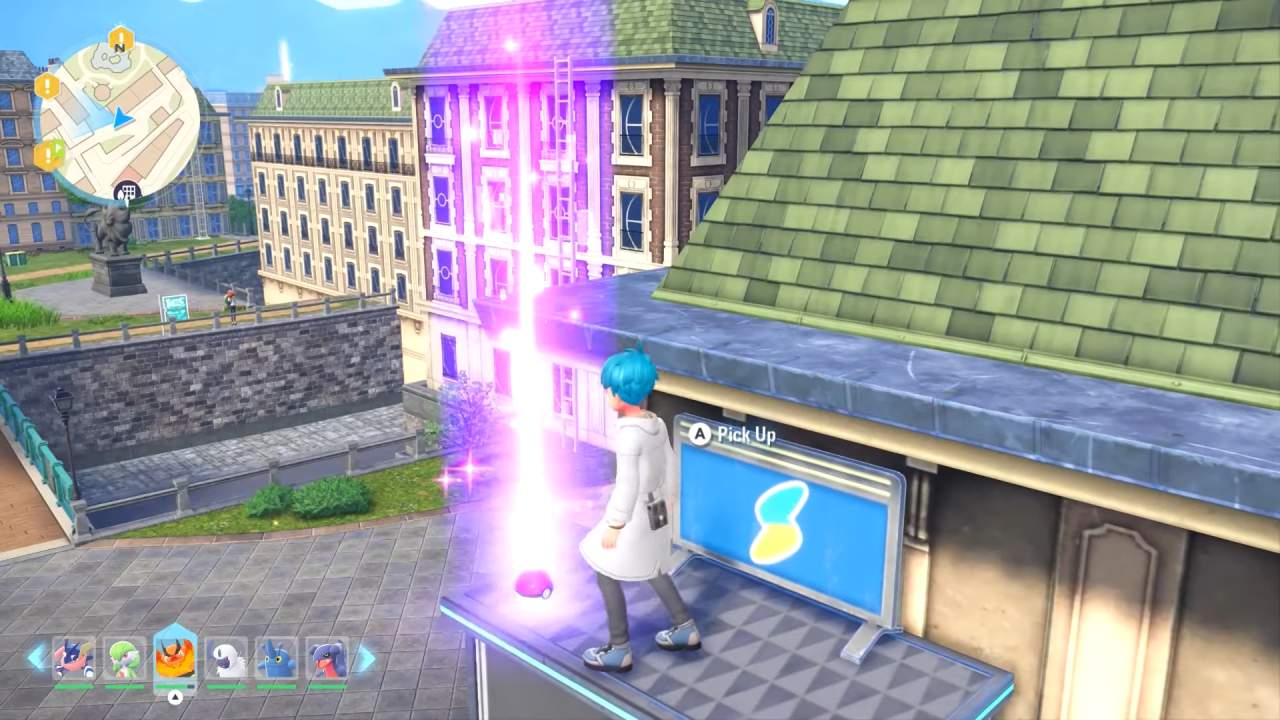
Whenever you see one, make the effort to climb or parkour to reach its location and pick it up. Each screw collected adds to your total, which can later be exchanged for valuable upgrades.
Unlocking the Racine Construction Company
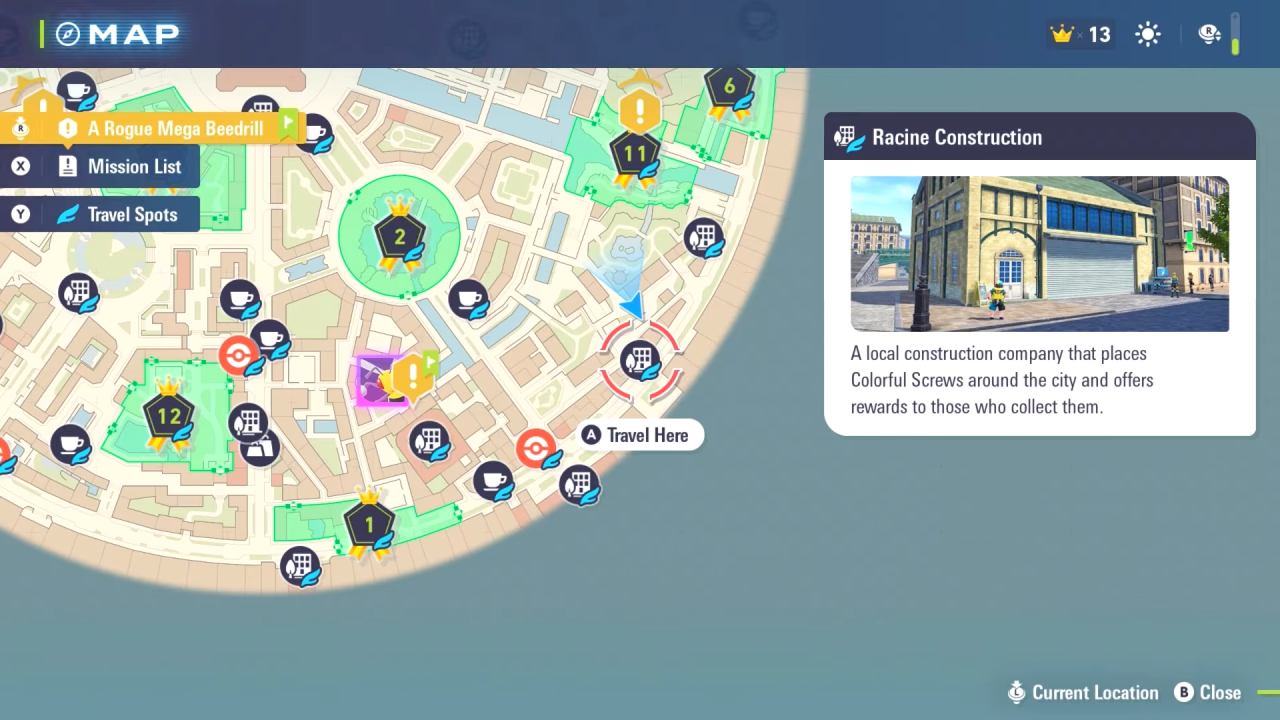
You will be able to start using Colorful Screws once you unlock the Racine Construction Company. This location becomes available after your battle with Canary, which occurs a few hours into the story. After completing that part of the game, return to the Racine Construction Company, where you will find an NPC outside the building.
Speak to this NPC to trade your collected Colorful Screws. When you open the trade menu, you will see several upgrade items available for purchase. Each upgrade can be leveled up to increase its effect in Pokémon Legends: Z-A.
Purchasing and Upgrading Items
Inside the Racine Construction Company shop, there are five different upgrade items that you can improve up to Level 3. Each level costs a certain number of Colorful Screws. The first level requires three Screws, the second requires five, and the third requires eight.

To completely upgrade one component, fifteen Screws are required. Each upgraded item offers a distinct kind of advantage that raises your overall game performance.
Effects of Each Upgrade
The Red Plush is a good option to improve initially since it boosts the experience your Pokémon gains from battles. Although it is less essential in the early stages of the game, the Gold Plush boosts your prize money earnings in Pokémon Legends: Z-A.
More Mega Shards are given to you when you break Mega Crystals when you have the Pink Plush. This can be useful later on in your journey. The Green Plush raises your character's health, so you can take more damage from Pokémon and not pass out during tough fights, especially when you're up against Mega Pokémon.
Lastly, the Blue Plush increases your catch rate, which helps you catch Pokémon that would be hard to see otherwise, like Delibird, which might need more than one Pokéball to be seen in Pokémon Legends: Z-A.
Recommended Upgrade Order
When deciding which upgrades to prioritize, it is most effective to focus first on the Red Plush to accelerate your experience gain. After that, upgrade the Green Plush to increase your survival during exploration, followed by the Blue Plush to improve your catching success.
Once these key upgrades are complete, you can begin investing in the Pink Plush for better Mega Shard collection and the Gold Plush for increased prize money. Continue searching every region for Colorful Screws to gather enough currency to strengthen all your upgrades and maintain steady progress throughout Pokémon Legends: Z-A.
Also, check our Pokémon Legends: Z-A Review. and other guides below:
- Pokémon Legends: Z-A Beginner's Guide | Gameplay Tips & Tricks
- Pokémon Legends: Z-A Guide | How to Choose a Starter
- Pokémon Legends: Z-A Guide | All Characters
- Pokémon Legends: Z-A Guide | All Pokémon Types
- Pokémon Legends: Z-A Guide | What is Mega Evolution
- Pokémon Legends: Z-A Guide | How to Activate Mega Evolutions
- Pokémon Legends: Z-A Guide | All New Mega Evolutions
- Pokémon Legends: Z-A Guide | All Base Game Mega Evolutions
- Pokémon Legends: Z-A Guide | How to Get Mega Charizard Y and Charizardite Y
- Pokémon Legends: Z-A Guide | How to Get Froakie Early
- Pokémon Legends: Z-A Guide | How to Create a Character
- Pokémon Legends: Z-A Guide | How to Get Revitalizing Twig
- Pokémon Legends: Z-A Guide | How to Catch Eevee
- Pokémon Legends: Z-A Guide | How to Get Mega Gengar and Gengarite
- Pokémon Legends: Z-A Guide | How to Get Mega Slowbro and Slowbronite
- Pokémon Legends: Z-A Guide | How to Get All Flabebe
- Pokémon Legends: Z-A Guide | How to Get Mega Alakazam and Alakazite
- Pokémon Legends: Z-A Guide | How to Get Houndoom
- Pokémon Legends: Z-A Guide | How to Find Yoga Master
- Pokémon Legends: Z-A Guide | How to Get Heracross
- Pokémon Legends: Z-A Guide | How to Get Gardevoir
- Pokémon Legends: Z-A Guide | How to Claim Mystery Gifts
- Pokémon Legends: Z-A Guide | How to Get All Wild Zone One Pokémons
- Pokémon Legends: Z-A Guide | How to Reach Rouge Froslass
- Pokémon Legends: Z-A Guide | How to Get All Wild Zone Two Pokémons
- Pokémon Legends: Z-A Guide | How to Get Sableye
- Pokémon Legends: Z-A Guide | How to Get Mawile
- Pokémon Legends: Z-A Guide | How to Get Tyranitar
- Pokémon Legends: Z-A Guide | How to Get Mega Charizard X and Charizardite X
- Pokémon Legends: Z-A Guide | How to Get Mega Beedrill and Beedrillite
- Pokémon Legends: Z-A Guide | How to Get Mega Pidgeot and Pidgeotite
- Pokémon Legends: Z-A Guide | How to Get Mega Kangaskhan and Kangaskhanite
- Pokémon Legends: Z-A Guide | How to Get Mega Pinsir and Pinsirite
- Pokémon Legends: Z-A Guide | How to Get Mega Gyarados and Gyaradosite
- Pokémon Legends: Z-A Guide | How to Get Mega Ampharos and Ampharosite
- Pokémon Legends: Z-A Guide | How to Get Mega Steelix and Steelixite
- Pokémon Legends: Z-A Guide | How to Get Mega Scizor and Scizorite
Senior Editor, NoobFeed
Latest Articles
No Data.