
Steam Machine vs. 4K Gaming: Small Box, Surprising Frame Rates
An early hands-on with the Steam Machine covers unboxing, setup, and frame rate testing across five major titles.
Hardware by Nahe Yan on Jul 05, 2026
Valve's return to living room gaming hardware has sparked debate over pricing, availability, and whether a compact SteamOS box can run modern games. A first look at the Steam Machine, from unboxing through a run of benchmarks across several titles, offers an early sense of what the device delivers and where its limits sit.
This is the Steam Machine. Priced at $1,349 for the 2TB model, with a randomized reservation queue determining who gets to buy one, months of debate followed over whether Valve had built the future of living room PC gaming or simply an interesting misstep. Mine finally arrived, so let us open it.
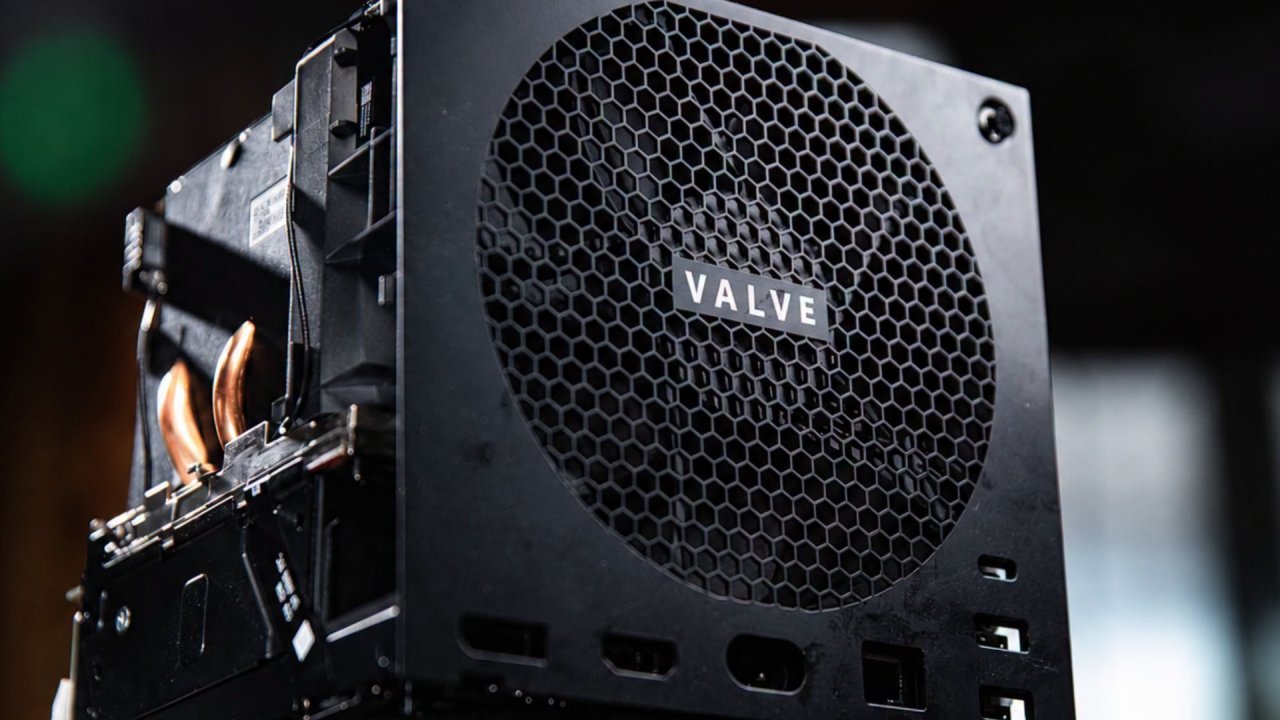
Unboxing the Steam Machine Reveals a Compact Design
The packaging follows Valve's usual approach. Pulling the tab on the front lets the whole box fold open, and it is smaller in person than photos suggest. It measures roughly 6in on a side, about the footprint of a lunchbox, and noticeably smaller than a Series X. Inside the box, you get the machine, an HDMI cable, a power cable, and a manual. The power cable plugs straight into the back, so there is no external power brick to manage.
The front plate is magnetic and pops off easily. Valve sells additional faceplates, and buyers of the 2TB model receive two extra plates included. Valve has also said it plans to release the CAD files so people can 3D print their own designs. On the front, there are two USB ports and a microSD slot. The back panel adds a USB-C port, two more USB-A ports, Ethernet, HDMI, DisplayPort, and the power port.
On first boot, the RGB light bar on the front lights up and is fully controllable through SteamOS. Set up mirrors the Steam Deck experience closely: sign in, update, and you are ready to go. Under the hood sits a semicustom six-core Zen4 CPU paired with a dedicated RDNA3 GPU, 8GB of VRAM, and 16GB of DDR5 memory. On paper, that puts it roughly in the RX 7600 territory.
SteamOS Interface Stays Consistent With the Steam Deck
Before getting into benchmarks, the operating system deserves a mention. If you have used a Steam Deck or Steam's Big Picture Mode on a PC, this will feel familiar. Navigating menus and browsing the store feels straightforward throughout. SteamOS also offers frequent discounts, since games tend to go on sale often, especially compared to competing consoles. There is also an overlay accessible from the right side of the controller.
One setting worth mentioning is the scaling filter. Setting it to sharp with a sharpness level of 5 makes a noticeable difference, as shown in the benchmark results below. Many people skip this setting entirely when playing at 2K, and the image ends up blurry as a result, which is not ideal.
Benchmark Results Across Several Major Titles
Crimson Desert was tested first, running at 4K with FSR set to Performance and all other settings set to Low. The result falls between 30 fps and 40 fps, and given the game's pacing, it remains playable at that frame rate and resolution. Testing the same game at 2K with FSR set to quality and settings still on low produced a noticeable jump, landing at close to 60 fps while still looking sharp.
From a couch, sitting at a normal distance from a TV, the difference between 4K and 2K here is difficult to notice. The 2K results averaged 50-60 fps. The Witcher 3 told a different story. At 4K, with all settings on low and ray tracing disabled, performance dropped below 20 fps, making it unplayable in that configuration, even in a cave rather than an open-world area.

It is a notable contrast, considering Crimson Desert is a newer title and performed considerably better. Switching to 2K resolution while keeping all settings on low brought performance up to around 40 fps, with a crisp image. Expedition 33 does not display its resolution setting in-game, so it must be set in Steam beforehand. At 4K with settings set to medium, performance averaged around 30 fps.
That is a reasonable result for 4K, and the game still looks appealing, but dips below 30 fps make combat sequences that require parrying, dodging, and jumping rough. Switching to 2K with settings set to high produced a substantial jump, landing between 40 and 45 fps, while still looking sharp and running smoothly.
Elden Ring ran well from the start. At 2K with settings maxed out, performance stayed around 60fps with a crisp, clean image. This is also where the earlier scaling filter setting matters most, since setting FSR to sharpness at full produces that sharper look.
Early impressions point to a promising start with room for improvement.
Testing the same settings at 4K required restarting the game and switching the screen mode to borderless, but once set, performance remained above 30 fps at max settings. Since Elden Ring does not use any upscaler, this result reflects native rendering.
Resident Evil Requiem concluded testing. Running at 4K with a mix of high settings and FSR set to balance, performance stayed capped at around 60 fps with a clean, polished image throughout, making it one of the strongest results of the session.
Overall, the first impression here is positive. Some people have expressed frustration with performance expectations, but given how small this device is, it is worth tempering them accordingly. So far, results look encouraging, and Valve is expected to continue improving things through driver updates.
A driver update focused on GPU performance recently arrived, suggesting further gains are likely. Developers are also expected to begin optimizing their titles for the Steam Machine, as happened with the Steam Deck over time.
Editor, NoobFeed
Gaming Hardware Updates
No Data.