
NVIDIA GeForce RTX 3080 Benchmark Review Modern Games at 1080p, 1440p, and 4K
Long term gaming performance analysis of the RTX3080 with modern engines, resolutions, and evolving VRAM demands.
Hardware by Shinji Okazaki on Jan 24, 2026
The crypto boom and the continued demand driven by AI have made it too expensive and hard to find for many casual consumers. Prices for secondhand RTX 3080s are now between $300 and $400.
The question is whether the card is still worth buying five years after its release. In some cases, it does. In some cases, there are evident limits that make it hard to give general advice.
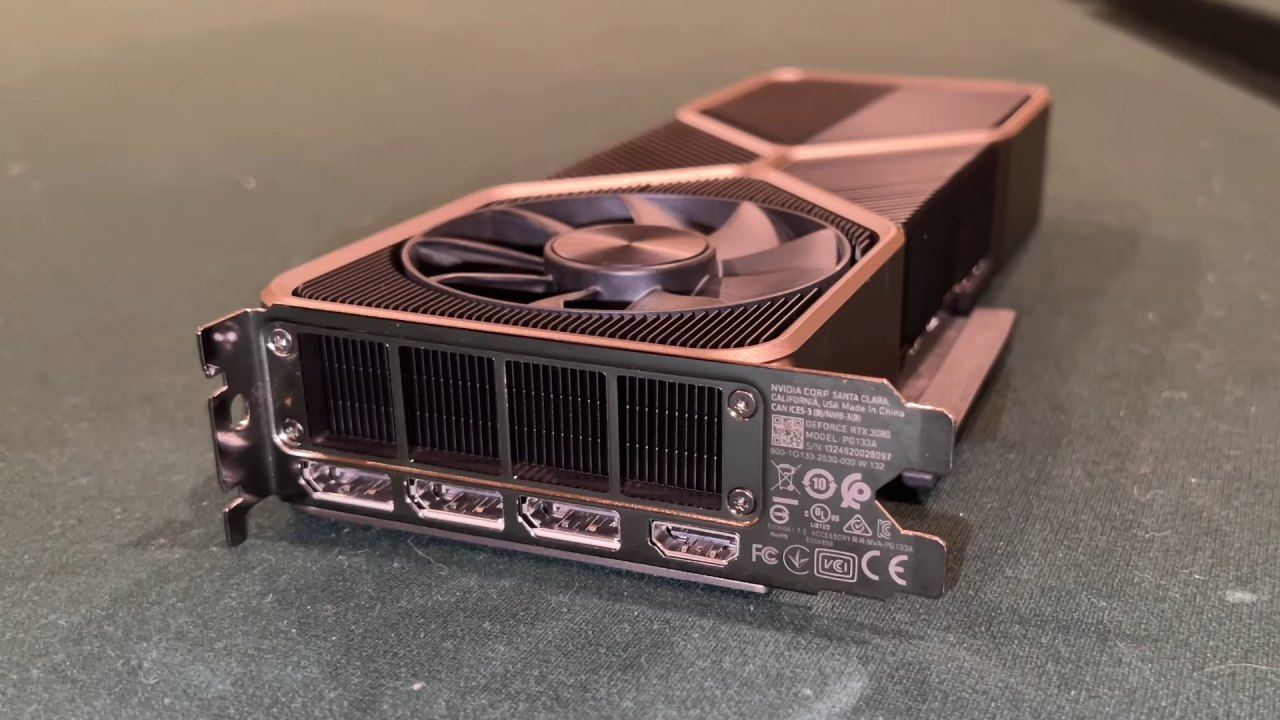
Set Up the Test System
RTX 3080 is tested on an Intel Core i7-14700K, which can reach up to 5.7 GHz on peak cores. An AMD X3D processor might give you better gaming performance. However, this setup was what was available and still works well, since CPUs of this class weren't available for more than a year after the RTX 3080 came out.
The motherboard in the system is a Gigabyte Z690 Aorus Elite AX DDR4, which allows the GPU and storage to utilize all PCIe 4.0 lanes. There is a WD Black SN771 1TB NVMe drive and a Timetec Gen4 NVMe drive in the storage. With 64GB of system memory, RAM capacity won't be a problem during testing.
Cyberpunk 2077's performance
Using the Transformer mode and the High preset, we test Cyberpunk 2077 with DLSS set to Quality. At 1080p, the average frame rate is 88 fps, with 1% of the time being 58 fps. However, the CPU is clearly slowing things down because the GPU is only using 50–60% of its power.
At 1440p, the GPU usage is over 90%, averaging 72 fps, with 1% lows at 43 fps, and there is significant stutter. At 4K, the average drops to 60 fps, while the lowest 1% remains at 40 fps. In general, Cyberpunk 2077 is still playable at all resolutions. You can change the settings to make it run more smoothly at higher resolutions.
How well Fortnite works
We test Fortnite with the High preset, Nanite and Lumen turned off, and DLSS set to Quality. RTX 3080 averages 163 fps at 1080p, with 1% lows at 83 fps. At 1440p, the average is still high at 149 fps, with 1% lows at 72 fps. At 4K, the average frame rate is 99 fps, with a low of 42 fps. The results show that the card's memory interface and computational power remain very strong, even though the number of pixels has increased significantly.
Performance of the Enhanced Edition of GTA5
We test GTA5 Enhanced Edition at the High RT preset with DLSS Quality and depth of field turned off. At all resolutions, the CPU slows things down, so performance numbers are the same across the board. The average is about 85 fps, and the lowest 1% is close to 70 fps. Higher resolutions don't cause much of a performance drop. The Enhanced Edition of GTA5 has smoother frame pacing, whereas the classic edition can show higher peak frame rates.
How well Marvel Rivals does
We test Marvel Rivals at the High preset with DLSS Quality using Unreal Engine 5 and DirectX 12. At 1080p, the average frame rate is 98 fps, with 1% lows at 36 fps. There is a perceptible delay during big team fights. At 1440 p.m., the average frame rate drops to 83fps, and the lowest frame rate is 39fps. The average frame rate at 4K is 66 fps, and the 1% lows are 39 fps. The game runs well at 1080p and 1440p, although it may use some more tweaking at 4K.
How well Minecraft Bedrock works
We tested Minecraft Bedrock version 1.21.100 with Vibrant Visuals set to Ultra, a 16-chunk render and simulation distance, and TAAU set to native. At 1080p and 1440p, where average frame rates are over 105 fps, the CPU gets stuck. Performance drops drastically to 33 fps at 4K, suggesting that memory is running low. Lowering the parameters improves performance across all resolutions without significantly worsening the visuals.
Oblivion Remastered's Performance
Oblivion Remastered, which uses Unreal Engine 5, doesn't work well on any of the platforms we tried. The average frame rate in 1080p is 42 fps, with a minimum of 9. The average is 49 fps at 1440p, with 1% lows at 8 fps. At 4K, the average drops to 37 fps, while the 1% lows rise to 19 fps. Changing the resolution and settings doesn't fix the stuttering, which makes performance inconsistent.
How well does Red Dead Redemption2 work?
We test Red Dead Redemption2 with the Balanced preset, low grass settings, and DLSS Quality. RTX 3080 averages 109 fps at 1080p, and 1% of the time it drops to 86 fps. At 1440p, the average frame rate is 89fps. At 4K, the average frame rate is still good at 72 fps, with 57 fps in the 1% lowest. The card performs well with this title across all tested resolutions.
How Rust Works
Rust is hard to work with because it has high texture requirements, even when it is old. At 1080p with full-resolution graphics, the average frame rate is 78 fps, with 1% lows at 39 fps. The average frame rate drops to about 20fps at 1440p and 4K. Lowering the texture resolution makes the game playable again, showing the limits of VRAM rather than sheer computational power.
The Performance of the Finals
The High setting for the Finals has Dynamic RTX Global Illumination set to High and DLSS Quality. At 1080p, the average frame rate is 105 fps, with 1% lows at 64 fps. The CPU is what limits the performance. At 1440 p.m., the average remains at 103 fps, with 61 fps as the 1% lowest. At 4K, the average frame rate decreases to 78fps, with 42fps 1% lows and a little stuttering after respawns.
How well Warzone works
Warzone runs smoothly at all resolutions, but occasionally stutters. At 1080p, the average frame rate is 116 fps, with 1% lows at 57 fps. At 1440p, the average frame rate is 111 fps, with 1% lows at 45 fps. At 4K, the average frame rate is 83 fps, with a low of 42 fps. Changing settings makes things more consistent, which is very important for competitive gaming.
The Ampere Architecture and Compute Features
The Ampere architecture makes big improvements to FP32 pipelines, increasing the number of FP32 data routes compared to older versions. This doesn't quadruple performance, but it does give a 15–30% boost, which is about the same as the increase in power draw. RTX 3080 has 68 active SMs and 8,704 FP32 data pathways, making it far more powerful than the RTX 3070 and RTX 3070 Ti.
Memory Setup and Restrictions
RTX 3080 has a 320-bit memory interface and GDDR6X memory running at 19 Gbps, giving it more than 760 GB/s of bandwidth. The 10GB capacity, composed of 1GB modules, is now too little for recent games at 1440p and 4K. VRAM, not compute power, limits performance in some games. The 12GB version fixes this problem and performs better on newer GPUs, such as the RTX 4070.
.jpg)
Cache Structure and Frequencies
The GPU has an L2 cache of 5 MB, an L1 cache of 128KB, and a 64 KB texture cache per SM. This was a lot when it first came out, but GPUs have since had larger caches. The card works at higher speeds than what Nvidia recommends. It stays above 1.8 GHz under heavy stress and usually runs close to 2 GHz.
Power Use and Heat
When idle, it uses about 100W, but under a normal load, it uses 250W. In some cases, it can need up to 350W. Most gaming workloads need between 200 and 300 watts. A 750W power source is enough. The card has a 12-pin power port that works well with an adapter under normal settings.
Final Thoughts
RTX 3080 still plays games nicely at 1080p, 1440p, and even 4K. It still has good compute speed and memory bandwidth, but the 10GB of VRAM makes it challenging to play newer games with a lot of textures. The card still works after the adjustments.
Also, check our other NVIDIA articles below:
- NVIDIA GeForce RTX 5080 Review (2025): Still A 4K Gaming Powerhouse?
- NVIDIA RTX 5070 Review: Mid-Range Muscle or Marketing Hype?
- RTX 5070 Ti Review: Performance, Thermals & Power Efficiency Tested
- ASUS GeForce RTX 5090 LC Liquid Cooled GPU Review: Unmatched Silence & Speed
- MSI GeForce RTX 5090 32GB SUPRIM SOC Review: Power Efficiency, Cooling, and Gaming Performance
- INNO3D RTX 5060 Ti 16 GB X2 Review: Gaming Benchmarks, Temps, and Power Efficiency
- HP Omen 45L Review: RTX 5090 Performance, Thermals, and Value Analysis
- ASUS TUF Gaming GeForce RTX 5060 Ti Review: DLSS 4, Power Efficiency, and Gaming
- ASUS Prime RTX 5060 Ti OC 16GB Review: DLSS 4, Ray Tracing, & Thermals Tested
- NVIDIA GeForce RTX 5060 Review: Specs, Gaming, and Cost per Frame
- MSI GeForce RTX 5090 GAMING TRIO OC Review: A Monster Power GPU
Editor, NoobFeed
Gaming Hardware Updates
No Data.