

MSI MPG X870E Carbon Max WiFi Review: Ultimate AM5 Motherboard for Gamers
Next generation AM5 performance with Gen 5 expansion, advanced cooling, creator focused connectivity, and extensive debugging features
Hardware by Katmin on Mar 04, 2026
The AM5 socket may be considered old, but there are new motherboards built for it. At first glance, this board might look familiar, but it is actually the Max version.
Alongside it, MSI introduces extreme portable performance with the MSI Radar A18HX, powered by the AMD Ryzen 9 9955HX3D processor featuring 16 performance cores and 144MB of second-generation AMD 3D V-Cache technology.
It is positioned as the world’s fastest mobile gaming processor while also serving as a powerful workhorse for creators with extreme performance needs and no compromises.
The MSI Radar A18HX features MSI OverBoost Ultra technology, delivering 175W of graphics power to the RTX 5090 and an additional 85W to the AMD Ryzen 9 9955HX3D processor, resulting in a combined 260W of portable power. The CPU allows full overclocking for enthusiasts.
Connectivity includes two USB4 ports, a full-size SD card reader, and an RJ45 port. The 18in miniLED 4K display runs at 120hz with DisplayHDR1000 support. It also includes Gen5 NVMe storage with a dedicated heat pipe for cooling, ensuring strong performance across gaming, content creation, and AI workloads.
Introducing the MPG X870E Carbon Max WiFi
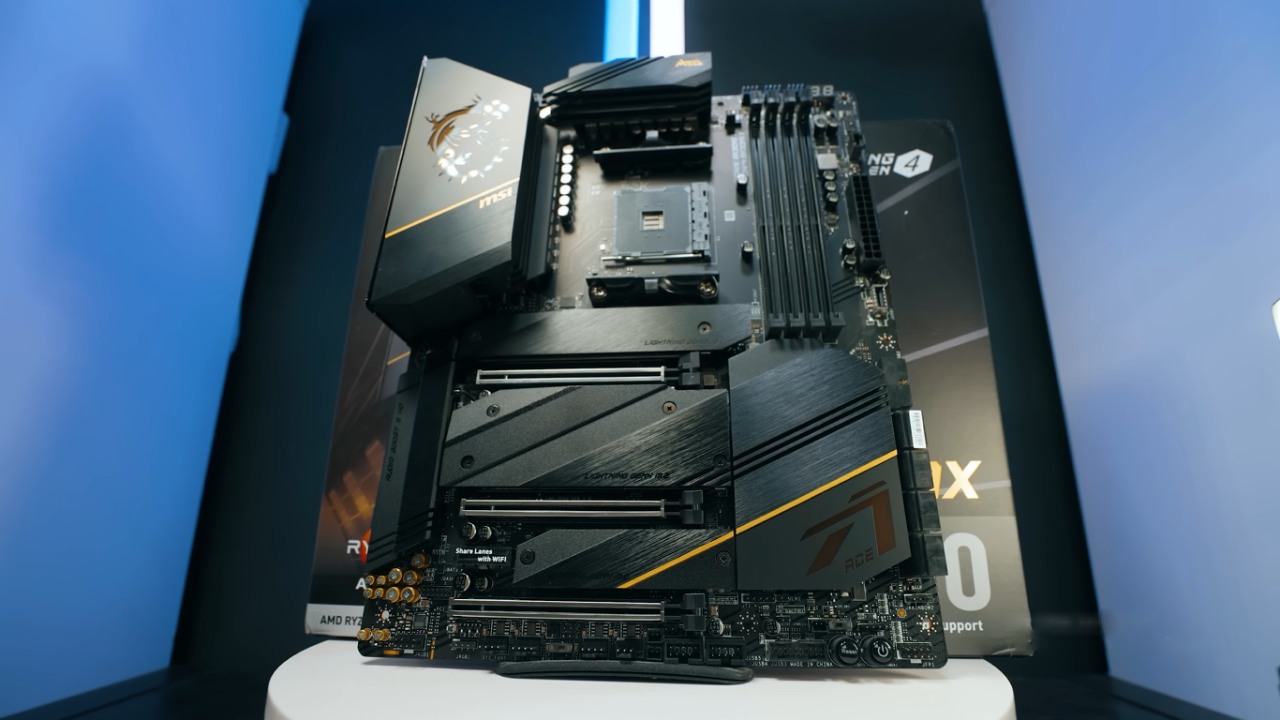
MSI's next-generation improvement to its AM5 lineup is the MPG X870E Carbon Max WiFi. The "Max" name means that this is a new version with new features. There were different versions of AMD motherboards before, including the X570S, where the "S" stood for a new version.
Here, the key upgrades include Lightning Gen5 support, an OC Engine, EZ PCIe Release, enhanced DIY-friendly features, and a PinSafe design that makes handling safer and cleaner.
Inside the box, we find the magnetic WiFi antenna with quick connectors, SATA cables, an M.2 standoff, MSI’s multifunction tool key, front panel extension connector, RGB splitter cables including ARGB converters, and a quick installation guide. The magnetic antenna connects easily without screwing and detaches just as quickly.
Improved Design and Build Safety
The flush design behind the power connectors is one alteration that stands out. Usually, soldered tips stick out a little and can be pointy, but the 24-pin and other power connections here are smooth and flat. We still need to be careful with the board because there are SMD parts underneath, but the better architecture makes it less likely that someone would get hurt when installing it.
The board features robust cooling for power delivery, identical to the previous version but more than sufficient for creators and overclockers alike. The AM5 socket is paired with four DDR5 slots. A small LED near the RAM slots lights up if memory is installed incorrectly. Standard debug LEDs for CPU, DRAM, VGA, and Boot are present, along with a Dr.Debug display for POST and error codes.
Power Delivery and Fan Headers
At the top, there are two 8-pin EPS connectors for CPU power. There are a total of seven fan headers. CPU_FAN1 can handle 2A, which is 24W at 12V. The pump header can handle 36W. Each of the other system fan headers gives 12W. The JAF2 EZ connector adds more features and can handle up to 36W, which is perfect for MSI ecosystem parts.
There are three 5V ARGB headers and one 12V RGB header. The debugging zone includes the Dr.Debug display and POST LEDs, which are extremely helpful during first boot.
Internal Connectivity and Headers
The angled connectors include a front panel USB-C header supporting USB3.2Gen2x2 at 20Gbps with 27W power delivery. Four SATA ports and dual USB3.2Gen1 headers provide front panel connectivity at 5Gbps each.
Additional headers include Safe Boot pins, Clear CMOS pins, speaker header, LED switch, power and reset buttons, display pass-through header for GPU-to-USB4 routing, OC clock headers, BIOS debug header, dual USB2.0 headers, additional PCIe power connector, temperature sensor headers, front panel audio, and chassis intrusion header.
A hidden Trusted Platform Module header is also present for security-focused builds.
M.2 Storage and Toolless Installation
The board includes four M.2 slots with a completely toolless design. Press-release mechanisms allow easy removal of heatsinks without screws. The heatsinks are dual-sided for improved thermal performance. Magnetic ARGB integration is available for enhanced aesthetics.
Two M.2 slots connect directly to the CPU, while the other two connect via the chipset. None supports SATA-based M.2 drives. The top slot is ideal for PCIe Gen5 storage. The third slot accommodates longer drives, such as an 8TB module. Installation is simple using the push-lock mechanism, and MSI provides a tool for longer standoff adjustments.
.jpg)
PCIe Layout and Bandwidth
The primary PCIe slot runs at PCIeGen5x16 directly from the CPU. The secondary slot operates at PCIeGen5x8. If both are populated, bandwidth splits to x8/x8. The lower slot operates at PCIe Gen4x4.
Some bandwidth sharing likely occurs between lower M.2 and PCIe slots, but the two CPU-connected M.2 slots maintain direct lanes.
The EZ PCIe Release simplifies GPU installation and removal. A button lets you switch between locked and unlocked states, which makes it much easier to swap the GPU than with typical retention clips.
Connections for the back I/O
There are a lot of ports on the back. There are nine USB-A connectors that can send data at 10Gbps. There are two USB4 Type-C connections that can send video and data at 40Gbps. Extra USB-C ports work at 10Gbps. Networking has two LAN ports that run at rates of 2.5Gb and 5Gb.
WiFi and Bluetooth connectors use push-in quick connectors. Audio output includes standard jacks and an optical port. Buttons for BIOS Flashback, Clear CMOS, and a programmable Smart Button are also included.
The HDMI port provides output for integrated graphics, while display pass-through requires an internal connection for discrete GPU routing.
Final Thoughts
The board has a lot of connectivity options, several Gen5 M.2 slots, powerful power delivery, great debugging tools, and easy installation features for developers. There are AI overclocking choices, however it can be better to get consistent long-term performance than the highest setting. The only real problem is that there is no 10Gb Ethernet; instead, the board has 5Gb Ethernet.
The MPG X870E Carbon Max WiFi is a very polished AM5 platform with useful DIY features and excellent tools for creators. This is a great option if we want a motherboard that strikes a good balance between performance, expandability, and ease of use.
Also, check our other hardware articles:
- AMD Ryzen 9 9950X3D Review: Setting The Standard For 2025 Gaming CPU
- Amazon Luna 2025 Review: Is Prime Gaming's Cloud Service Your Go-To For Casual Fun?
- AMD RX 9070 XT Review: AMD's RDNA 4 Champion for 1440p Gaming
- GeForce Now Ultimate: Ditching Your Gaming PC For Cloud RTX 4080 Power?
- NVIDIA GeForce RTX 5080 Review (2025): Still A 4K Gaming Powerhouse?
- Intel Core Ultra 9 285K Review And Performance Breakdown (2025)
- AMD Ryzen 7 9800X3D Review: 3D V-Cache Goes God Mode with Stunning Gaming Performance
- Intel Core Ultra 9 285K vs AMD Ryzen 7 9800X3D: In-Depth Gaming Performance and Benchmark Comparison
- NVIDIA GeForce RTX 5080 Super Performance In Cyberpunk 2077: Path Tracing & DLSS 4.0 Tested
- AMD Radeon RX 9070 XT In Cyberpunk 2077: Ray Tracing & FSR 4.0 Tested
- Intel Arc B580 Review: The $250 GPU Revolutionizing 1440p Gaming
- Intel Arc B570 Vs. B580: Value, Specs, And Real-World Gaming Performance
- RTX 5090 Laptop Vs. M4 Max MacBook Pro: Ultimate Raw Performance Vs. Battery Endurance
- Intel Arc b580 Vs. RTX 4060: Game Performance And Value Analysis
- RTX5090 Hell Is Us Demo 4K Ultra Benchmark: DLSS Vs. Native Performance Guide
- NVIDIA RTX 5070 Review: Mid-Range Muscle or Marketing Hype?
- Nintendo Switch 2 Review: Handheld Performance, Features & Value Breakdown
- RTX 5070 Ti Review: Performance, Thermals & Power Efficiency Tested
- Samsung Odyssey OLED G81SF Review 2025: Ultimate 32-Inch QD-OLED Gaming Monitor
- AMD RX 9070 Performance Review: Thermals, Clocks, and Real-World FPS
- AMD Ryzen 5 7600 Review: Best Budget Gaming CPU of 2025?
- AMD Radeon RX 7800 XT Review: RDNA 3 Power For Midrange Gaming
- Asus ROG RTX 5090 Astral OC Vs. Founders Edition: The 4K Gaming Benchmark
Senior Editor, NoobFeed
Latest Articles
No Data.