
ASRock B850M Challenger Wi-Fi Review: Budget AM5 Board with Essential Features
Minimalist design approach balances affordability with core functionality including Wi-Fi7, Gen5 storage, and reliable everyday performance support.
Hardware by Masaru Hoshino on Apr 10, 2026
The budget AM5 motherboard market is growing as new products emerge that are cheap yet still offer some current features. The new B850 from ASRock is a small micro-ATX solution that focuses on basic features, compatibility with current-generation hardware, and a simple design at a competitive price.
First Look and Box Contents
ASRock has released two versions of the B850M Challenger Wi-Fi, one in black and one in white. Both versions have the same characteristics. The board is a simple but fascinating choice in the $239 range.
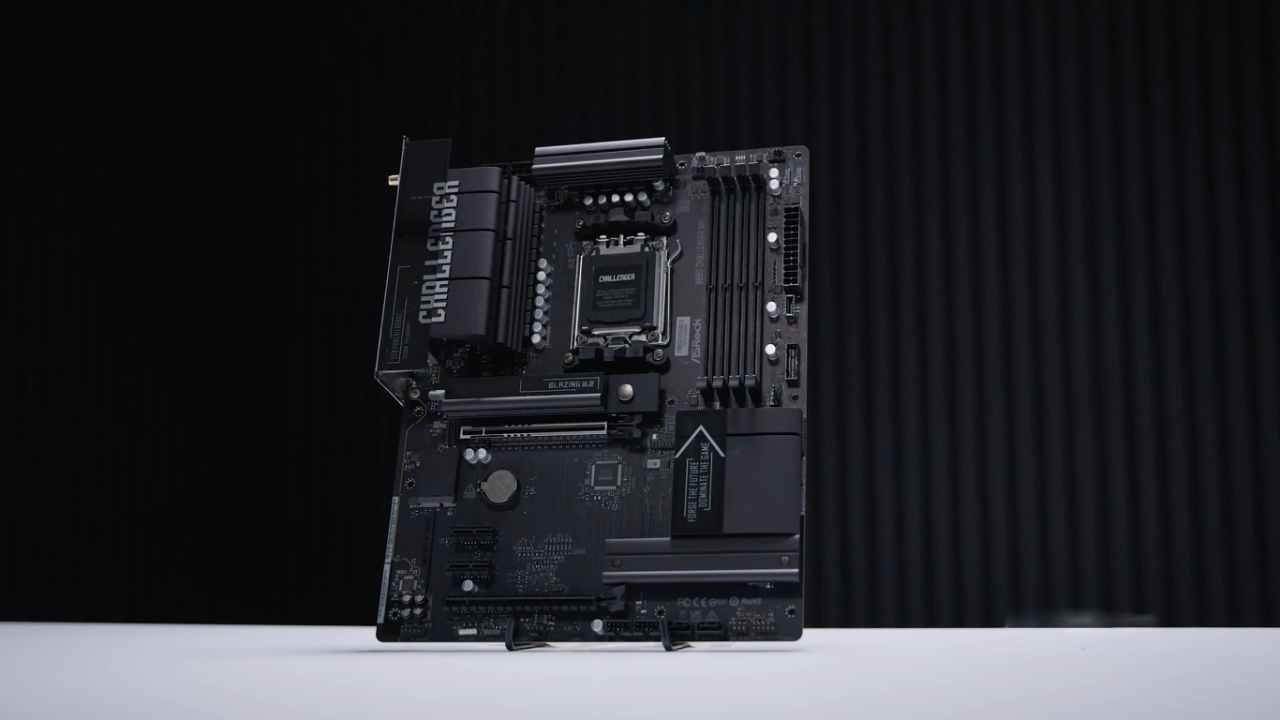
The things within the box are rather basic. The package includes an ASRock case emblem, a set of Wi-Fi7 dipole antennas, and SATA cables for 2.5-inch SSDs or 3.5-inch hard drives. It's rare for a 2026 model to have 4 SATA ports. There is also a sheet of themed stickers, as well as paperwork and fast installation instructions to help with putting in the CPU, RAM, M.2, and cooler.
Board Layout and Connectivity
The B850M Challenger Wi-Fi features a micro-ATX layout, making it a good choice for budget-conscious buyers. Yet, it still offers plenty of headers and connectivity options.
There are a front-panel audio header, a 4-pin 12V RGB header, and a 3-pin 5V addressable RGB header at the bottom. There are additionally three PWM fan headers and two USB 2.0 headers, which are usually utilized for RGB controllers or liquid coolers. There is also a transparent CMOS jumper and the usual front panel header for system controls.
There are four SATA ports on the right side, as well as a USB front panel header that probably supports up to 5GB and a USB Type-C front panel header. There is also a 24-pin power connector, a postcode debug LED array, additional RGB headers, and several PWM fan headers spread across the board.
There is an 8-pin EPS port at the top that powers the system, and with Ryzen processors, there is an additional 4-pin EPS connector.
Expansion Slots and VRM Design
There are three PCIe slots on the motherboard. The first slot is a PCIe Gen5x16 slot, and the second slot is an open-ended PCIe Gen4x1 slot. Even though it is physically x16, the third slot works at PCIe Gen4x4.
The VRM configuration features 8+1+1 phases, indicating the board is designed for budget-conscious users. It may not be the strongest in its class, but it is still good enough for most Ryzen 7000, 8000, and 9000 CPUs as long as they don't use too much power.
CPU Socket and Memory Support
The board has an AM5 connector and standard mounting support, so it works with many different coolers. The socket's design may look complicated, but it's easy to install if you know how.
Memory compatibility includes up to 4 DDR5 DIMMs, each capable of holding up to 256GB and running at up to 8000 MT/s.
Storage Configuration
Compared to other boards in this sector, the storage possibilities are a bit limited. There are two M.2 slots: one PCIe Gen5x4 slot with a heatsink and one PCIe Gen4x4 slot that is in the middle of the PCIe slots.
The fact that there are just two M.2 slots is strange, especially because other micro-ATX boards in the same price range usually have more.
.jpg)
Rear I/O and Networking
There are Wi-Fi7 antenna connectors on the back I/O panel, and the Wi-Fi module is under the I/O cover. An HDMI 2.1 port is used to send display output for integrated graphics.
There are two USB 2.0 ports and many USB 3.2 Gen 1 ports for connecting USB devices. There is also a BIOS flashback port and button, as well as normal audio connectors for line-in, line-out, and microphone input. There is no USB Type-C port on the back, which is a big deal because it shows how cheap the board is.
Final Thoughts
The B850M Challenger Wi-Fi includes a small number of features that are meant to keep prices down while yet providing the fundamental features that a modern AM5 motherboard should have. It features four SATA ports, Wi-Fi 7, 2.5GB Ethernet, and compatibility for Gen5 storage. This makes it a fantastic choice for projects on a budget.
However, its lower-tier status is evident in its limited features, such as a simple VRM design, a lack of a rear USB Type-C port, and only two M.2 slots. The board has a useful collection of features for its price range. It doesn't include any frills that aren't needed, which fits its Challenger series character.
Also, check our other hardware articles:
- AMD Ryzen 9 9950X3D Review: Setting The Standard For 2025 Gaming CPU
- Amazon Luna 2025 Review: Is Prime Gaming's Cloud Service Your Go-To For Casual Fun?
- AMD RX 9070 XT Review: AMD's RDNA 4 Champion for 1440p Gaming
- GeForce Now Ultimate: Ditching Your Gaming PC For Cloud RTX 4080 Power?
- NVIDIA GeForce RTX 5080 Review (2025): Still A 4K Gaming Powerhouse?
- Intel Core Ultra 9 285K Review And Performance Breakdown (2025)
- AMD Ryzen 7 9800X3D Review: 3D V-Cache Goes God Mode with Stunning Gaming Performance
- Intel Core Ultra 9 285K vs AMD Ryzen 7 9800X3D: In-Depth Gaming Performance and Benchmark Comparison
- NVIDIA GeForce RTX 5080 Super Performance In Cyberpunk 2077: Path Tracing & DLSS 4.0 Tested
- AMD Radeon RX 9070 XT In Cyberpunk 2077: Ray Tracing & FSR 4.0 Tested
- Intel Arc B580 Review: The $250 GPU Revolutionizing 1440p Gaming
- Intel Arc B570 Vs. B580: Value, Specs, And Real-World Gaming Performance
- RTX 5090 Laptop Vs. M4 Max MacBook Pro: Ultimate Raw Performance Vs. Battery Endurance
- Intel Arc b580 Vs. RTX 4060: Game Performance And Value Analysis
- RTX5090 Hell Is Us Demo 4K Ultra Benchmark: DLSS Vs. Native Performance Guide
- NVIDIA RTX 5070 Review: Mid-Range Muscle or Marketing Hype?
- Nintendo Switch 2 Review: Handheld Performance, Features & Value Breakdown
- RTX 5070 Ti Review: Performance, Thermals & Power Efficiency Tested
- Samsung Odyssey OLED G81SF Review 2025: Ultimate 32-Inch QD-OLED Gaming Monitor
- AMD RX 9070 Performance Review: Thermals, Clocks, and Real-World FPS
- AMD Ryzen 5 7600 Review: Best Budget Gaming CPU of 2025?
- AMD Radeon RX 7800 XT Review: RDNA 3 Power For Midrange Gaming
- Asus ROG RTX 5090 Astral OC Vs. Founders Edition: The 4K Gaming Benchmark
Editor, NoobFeed
Gaming Hardware Updates
No Data.