
ASRock B850M Rock Review: Budget AM5 Motherboard with Minimal Features
ASRock B850M Rock delivers a stripped-down AM5 experience with reduced VRM, fewer features, and aggressive cost-cutting measures.
Hardware by Masaru Hoshino on Apr 21, 2026
Earlier in the year, ASRock launched its RockSolid series as a rebranding initiative aimed at entry-level products. The new ASRock B850M Rock is squarely positioned in that range, with a target price of $160 and a minimum of basic functionality to support modern PC construction.
What Comes in the Box
Taking a closer look at the package, the included accessories are minimal. The built-in Wi-Fi6E has antennas, unlike the newer Wi-Fi7 standard on most modern motherboards. It comes with a set of SATA cables to use with 2.5in SSDs or standard hard drives. The only documentation is a brief installation guide that walks you through installing the CPU, RAM, and storage.
Board Layout and Connections
Looking at the motherboard itself, the design is relatively simple. At the bottom left, there are headers for front-panel audio, a 4-pin 12V RGB header, and a 3-pin 5V addressable RGB header. There is a PWM fan header nearby, and two USB 2.0 headers to support legacy devices, liquid coolers, or RGB controllers. System power and status indicators connectors are also found here.
Four SATA storage device ports are located on the right side, and there are USB 3.2 Type-A and Type-C front-panel connectors. The board is powered via a 24-pin power connector, with two other 3-pin 5V RGB headers and a postcode debug LED array.
Three PWM fan headers are available at the upper right to offer cooling options. There is one 8-pin EPS connector on the top left, which supplies the CPU.
Growth and Internal Characteristics
The board has two PCIe slots: a PCIe Gen5x16 slot on the top and a PCIe Gen4x4 slot on the bottom. The Wi-Fi module can be removed and upgraded to a Wi-Fi6E card beyond the provided one.
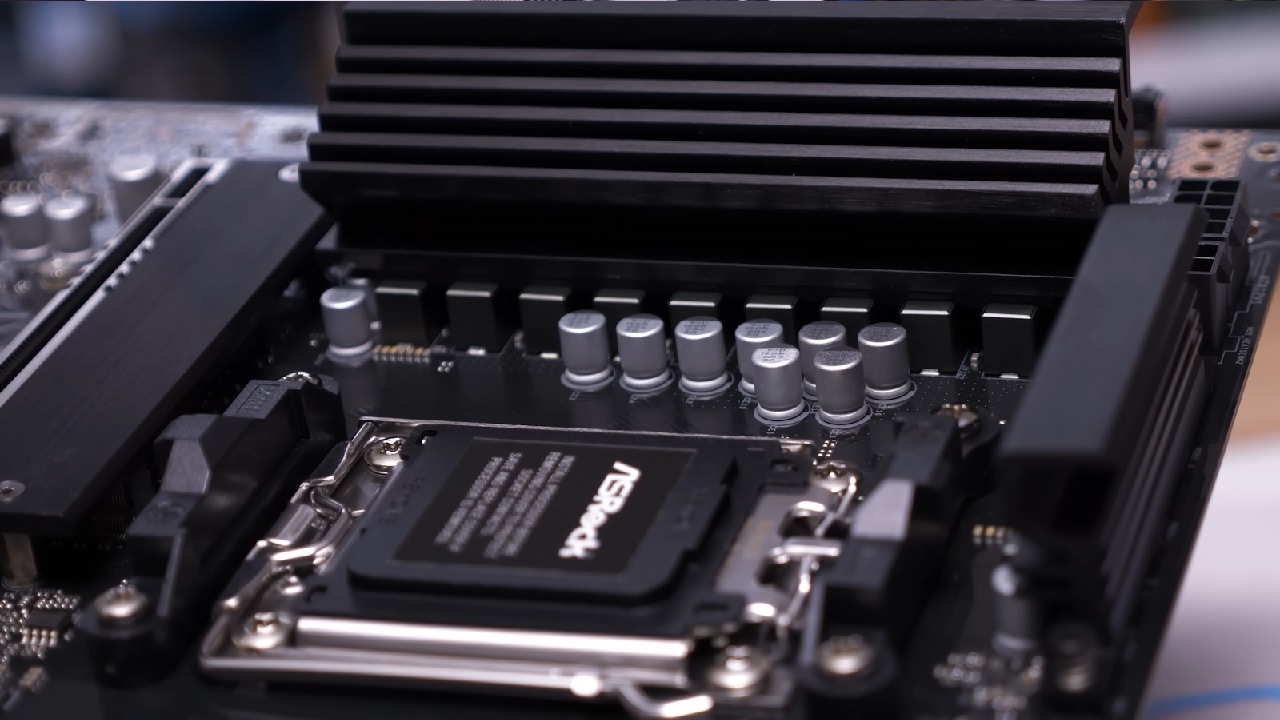
The VRM layout is a 6+1+1-phase layout, much smaller than those on other B850 mATX boards and even some ITX boards. The motherboard has a standard AM5 socket and standard cooler mounting.
Memory and Storage Support
The maximum memory support is two DDR5 DIMM slots, with a maximum capacity of 128GB and a maximum speed of 8200 MT/s. For storage, there are two M.2 slots: one PCIe Gen5x4 and one PCIe Gen4.
Rear I/O Overview
The back I/O panel has Wi-Fi antenna connectors, DisplayPort and HDMI outlets (built-in graphics), two USB 2.0 ports (one of which is used by BIOS Flashback), multiple USB 3.2 ports, a 2.5Gb Ethernet port, and standard audio jacks. There is also a BIOS Flashback button and activity light.
Comparison with B850M Challenger Wi-Fi
The similarities are evident when the B850M Challenger Wi-Fi is compared to the B850M. The two boards are almost identical in many of the ICs and surface-mounted components. The B850M Rock, however, eliminates two DIMM slots, simplifies VRM, and changes the layout slightly.
The physical size is also dissimilar. Although it has standard mATX mounting points, the board is shorter and can be used in compact cases between ITX and mATX.
Design Tradeoffs and Positioning
ASRock seems to have been very aggressive in reducing costs by eliminating features that increase manufacturing costs. This approach is emphasized by the reduced VRM design and the limited memory slots. Although the board still has the basic functionality, it loses the ability to expand and be robust.
Despite these trade-offs, the design may be of interest to users building small systems or seeking to enter the AM5 platform at a low cost. The reduced footprint enables it to be used in niche cases where compatibility is required.
Final Thoughts
The ASRock B850M Rock is aimed at providing the bare minimum at the most affordable cost. It is compatible with modern CPUs, DDR5 memory, and PCIe Gen5 storage, but cuts almost everything else. What comes out is a motherboard that serves its simple purpose without much more.
Also, check our other hardware articles:
- AMD Ryzen 9 9950X3D Review: Setting The Standard For 2025 Gaming CPU
- Amazon Luna 2025 Review: Is Prime Gaming's Cloud Service Your Go-To For Casual Fun?
- AMD RX 9070 XT Review: AMD's RDNA 4 Champion for 1440p Gaming
- GeForce Now Ultimate: Ditching Your Gaming PC For Cloud RTX 4080 Power?
- NVIDIA GeForce RTX 5080 Review (2025): Still A 4K Gaming Powerhouse?
- Intel Core Ultra 9 285K Review And Performance Breakdown (2025)
- AMD Ryzen 7 9800X3D Review: 3D V-Cache Goes God Mode with Stunning Gaming Performance
- Intel Core Ultra 9 285K vs AMD Ryzen 7 9800X3D: In-Depth Gaming Performance and Benchmark Comparison
- NVIDIA GeForce RTX 5080 Super Performance In Cyberpunk 2077: Path Tracing & DLSS 4.0 Tested
- AMD Radeon RX 9070 XT In Cyberpunk 2077: Ray Tracing & FSR 4.0 Tested
- Intel Arc B580 Review: The $250 GPU Revolutionizing 1440p Gaming
- Intel Arc B570 Vs. B580: Value, Specs, And Real-World Gaming Performance
- RTX 5090 Laptop Vs. M4 Max MacBook Pro: Ultimate Raw Performance Vs. Battery Endurance
- Intel Arc b580 Vs. RTX 4060: Game Performance And Value Analysis
- RTX5090 Hell Is Us Demo 4K Ultra Benchmark: DLSS Vs. Native Performance Guide
- NVIDIA RTX 5070 Review: Mid-Range Muscle or Marketing Hype?
- Nintendo Switch 2 Review: Handheld Performance, Features & Value Breakdown
- RTX 5070 Ti Review: Performance, Thermals & Power Efficiency Tested
- Samsung Odyssey OLED G81SF Review 2025: Ultimate 32-Inch QD-OLED Gaming Monitor
- AMD RX 9070 Performance Review: Thermals, Clocks, and Real-World FPS
- AMD Ryzen 5 7600 Review: Best Budget Gaming CPU of 2025?
- AMD Radeon RX 7800 XT Review: RDNA 3 Power For Midrange Gaming
- Asus ROG RTX 5090 Astral OC Vs. Founders Edition: The 4K Gaming Benchmark
Editor, NoobFeed
Gaming Hardware Updates
No Data.