
Gigabyte X870 AORUS Pro Review: Performance, Design, and Value Analysis
Gigabyte X870 AORUS Pro delivers impressive cooling and performance but faces strong competition in its price range.
Hardware by Tanvir Kabbo on Oct 17, 2025
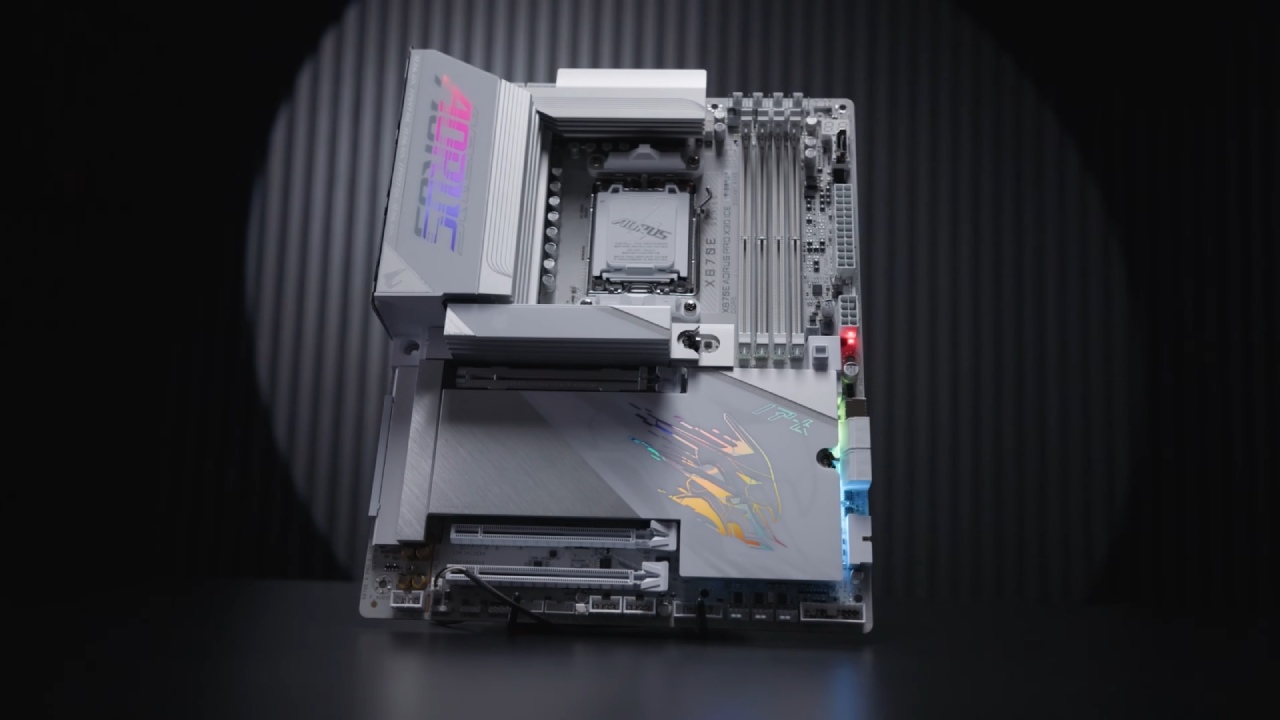
People were quite excited about the Gigabyte X870 AORUS Pro motherboard and couldn't wait to see how it looked and how well it worked. The board comes in black and icy white colors and has a six-layer PCB with 2oz copper plating. This is enough for handling power, but it's a little out of date compared to competitors' boards that have eight-layer PCBs.
The Gigabyte B850 AI Top and other high-end boards show how eight-layer PCBs improve lifetime, signal insulation, audio performance, and cooling efficiency. This is a major area where the X870 AORUS Pro falls short.
Design and Aesthetics
From a design standpoint, the X870 AORUS Pro is visually impressive. It showcases aluminum sanding techniques and cross-component tracing. The ice white variant stands out with painted plugs and attention to detail.
However, some elements feel dated, such as cheap plastic plating and dim embedded RGB lighting under the chipset plate. While the motherboard includes an Aros backlit logo on the VRM roof and four RGB connectors for customization, some of the design choices add unnecessary complexity and cost.
CPU and Chipset Performance
The AM5 CPU socket and X870E chipset give the motherboard power. It can work with Ryzen 7000 to 9000 series CPUs. It has 24 PCIe 5.0 lanes for connecting GPUs, NVMe drives, and USB 4 devices. The board has eight parallel phases and two VRMs, which together provide it 1,560A of power.
While this is theoretically sufficient to run any Ryzen 9000 processor, the use of parallel phases introduces higher latency than direct phases, which may cause minor lag in CPU-intensive tasks such as video editing.
The VRM's cooling solution is quite well-designed. It has a two-segment block with 8mm copper heat pipes, a thermal-padded double-contact design, and thick aluminum winglets. The temperatures stayed at 55°C during stress testing, which showed that heat was being distributed and radiated well.
This architecture makes sure that the board can handle high-end CPUs like the Ryzen 7 and 9 without getting too hot. But the performance of excessive overclocking might be limited.
RAM Support
The X870 AORUS Pro supports up to 256GB of DDR5 RAM in a dual-channel configuration, reaching speeds of 8,200 MT/s. Achieving maximum performance requires RAM sticks with Heinx M or Samsung BI architecture. Affordable and high-performance options such as Patriot’s Viper Extreme 5 can fully utilize the motherboard’s capabilities without issue.
.jpg)
Storage
There are four NVMe slots, thus there are a lot of storage options. Three of the slots get power from four PCIe 5.0 lanes each, which can move data at speeds of up to 128 GB/s. The fourth slot gets power from PCIe 4.0 lanes at 64 GB/s. The cooling works well, with separate thermal pads and thick metal blocks keeping the temperature below 40°C even when the computer is being used a lot.
NVMe heat plates with screwless mechanisms make them easier to use, and this is a standard that competitors like ASUS may adopt from.
PCIe Expansion
Expansion capabilities include three 16-in slots, with the primary GPU slot receiving 16 PCIe 5.0 lanes and reinforced with metal. Secondary slots are chipset-fed and suitable for additional storage or other components.
However, using PCIe 5.0 bifurcation reduces the GPU’s 16 lanes to 8, which is still sufficient for high-end GPUs like the RTX 5090. This limitation is a universal Ryzen 9000 characteristic, not specific to Gigabyte.
Back I/O and Connectivity
The back IO includes limited but high-performance USB options, including USB4 ports capable of 40GB/s, for a total of 120GB/s of USB bandwidth. Combined with front-panel connectivity, the motherboard can handle 150 GB/s. Display outputs include three-way rear options and a front HDMI port for secondary monitoring, a feature unique to Gigabyte.
Connectivity also includes a 2.5GB LAN port, which feels underwhelming for a board at this price point. However, a premium dual-band Wi-Fi7 adapter mitigates this somewhat.
Audio
Audio performance uses a 7.1-channel ALC1220 codec from Realtek, enhanced with 500 μF capacitors. However, the absence of film-based WIMA capacitors diminishes recording and playback quality compared to previous Gigabyte boards. While acceptable, it is a downgrade from the brand’s previous high standards.
Cooling and Troubleshooting
Cooling support is robust, with eight PWM fan connectors, two water pump headers, two thermal sensors, and a water flow sensor, making it ideal for intricate custom water-cooling setups.
The troubleshooting system is one of the X870 AORUS Pro's strongest points, featuring an easy-to-use debugger, a precise OLED error screen, soldered power/reset buttons, and a CPU-less BIOS flashback button, ensuring quick and accurate diagnostics.
.jpg)
Final Thoughts
The Gigabyte X870 AORUS Pro costs about $330 US and has great engineering in areas like VRM cooling, RAM support, storage, and troubleshooting. But things like six-layer PCB design, an old LAN, poor audio quality, and dull RGB options make it less valuable.
The X870 AORUS Pro seems like it's only half-finished for the price when compared to other products like the MSI Mag X870 Hero. If you can't get a big discount, buying this motherboard might not be the best choice.
Also, Check Our Other AMD articles:
- AMD Ryzen 9 9950X3D Review: Setting The Standard For 2025 Gaming CPU
- AMD Ryzen 7 9800X3D Review: 3D V-Cache Goes God Mode with Stunning Gaming Performance
- AMD RX 9070 Performance Review: Thermals, Clocks, and Real-World FPS
- AMD Ryzen 5 7600 Review: Best Budget Gaming CPU of 2025?
- AMD Radeon RX 7800 XT Review: RDNA 3 Power For Midrange Gaming
- Sapphire NITRO+ AMD Radeon RX 9070 XT Review: The Ultimate 4K Gaming GPU
- AMD Ryzen 7 7800X3D: Delivers Gaming Performance Far Beyond Expectations
- AMD Ryzen 9 7900X Review: Powering the AM5 Era with DDR5 & PCIe 5.0
- ASRock Radeon RX 7800 XT Challenger OC Review: Best Price-to-Performance GPU of 2025
- Intel Core i9‑14900K vs. AMD Ryzen 7 7800X3D: Power Profiles & Gaming Benchmarks
Senior Editor, NoobFeed
Gaming Hardware Updates
No Data.