
ASUS ExpertBook Ultra B9 Review: Thin, Light, Powerful, and Surprisingly Stylish
A refined ultra-light notebook that blends premium materials, thoughtful engineering, and modern design into a highly portable form factor
Hardware by Tanisha Aria on Jan 31, 2026
The ASUS ExpertBook Ultra B9 is one of the best and most exciting ultraportable laptops to come out in recent years. ASUS has created a device that feels like a culmination of its past innovations, combining high-quality materials, careful design, strong performance, and up-to-date features.
At first glance, what looks like a thin business notebook quickly turns out to be a carefully built machine that can do a lot more than just work.
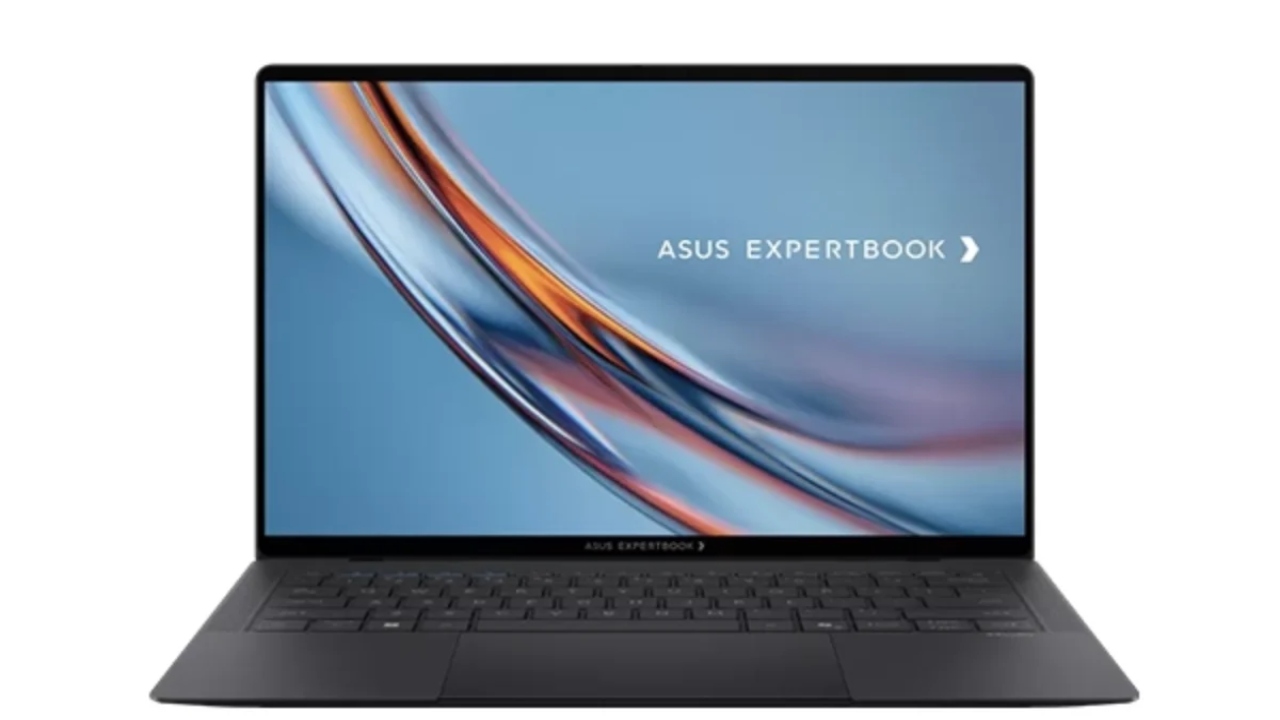
A Design That Feels Like Engineering Art
Looking at the ExpertBook Ultra B9 for the first time makes you feel like it's unique. The notebook is very small and light—it weighs less than 1 kg—which makes it stand out right away from most of its competitors.
At its thinnest point, it's only 1 cm thick and 31 cm long. This makes it easy to fit into bags and other small places. When you open the lid, it feels deliberate and smooth, and the body sitting firmly on a desk adds to the sense of well-made quality.
The outside is made of a material called cerillunium, which is a mix of ceramic and metal. This makes the body feel high-end and long-lasting. The notebook is made to last in tough conditions, so it can be used in challenging settings without losing its stylish look.
Overall, the build quality doesn't feel as stiff and businesslike as with some business computers. It's a good mix of professionalism and personality.
Keyboard, Trackpad, and Everyday Interaction
The notebook still looks great on the inside, with a clean, easy-on-the-eyes style. There is enough room between the keys on the half-size keyboard for comfortable typing, and the travel distance is 1.5 mm. Typing feels easy, and you don't have to make many changes.
Even with the white LED backlighting, it can look a little dim, and lighting conditions may make the key symbols less clear. It's often easier to read the keys during the day when the lighting is off.
One thing that stands out is the keyboard. It is a full-glass, multi-touch haptic trackpad that works by sensing pressure rather than a physical button.
As a result, the experience is smooth and accurate, like what many people like about high-end computers. The subtle haptic feedback is consistent and satisfying, making it easy to navigate during long work sessions.
Thoughtful Extras and Audio Experience
The fingerprint reader in the power button works with Windows Hello, so you can get in quickly and safely. There are two speaker vents on either side of the keyboard.
The speakers sound clear and surprisingly loud, even though the laptop is pretty thin. For talks, playing media, and casual fun, they are more than enough.
A unique touch is the LED strip under the ExpertBook name. It turns on when the gadget starts up and when it shuts down, giving it personality. It looks nice, but it doesn't do much. It's like a missed opportunity because it could have been used for notifications or system-state indicators.
OLED Display With Practical Trade-Offs
The 14-inch OLED screen has a 1800p resolution and a matte finish that blocks glare. At first glance, the matte finish may make the panel look less colorful than you'd expect from OLED technology.
This can slightly reduce brightness and contrast. However, this coating does a great job of handling reflections in bright places and greatly lowers fingerprints, which is especially helpful on a touchscreen.
The panel is bright (about 550 nits) and supports HDR, which makes watching content more fun. The colors are bright, and the general brightness is good for most well-lit indoor settings. Even though the matte coating slightly dulls the typical OLED punch, the thin bezels give it a more modern look and make the experience feel more immersive.
.jpg)
Camera, Security, and Connectivity
Video calls can be made successfully with a 1080p webcam, which works well in good lighting but not so well in low light. Adding an IR sensor and a privacy screen makes the door safer and enables features like locking it when you leave the room.
There are a lot of ports for a device this size. It has two Thunderbolt 4 ports, two USB 3.2 Gen 2 Type-A ports, an HDMI 2.1 port, and a 3.5mm headphone jack. With the included 90W adapter, you can charge via either Thunderbolt 4 port, giving you more options for everyday use.
The ExpertBook Ultra B9 has a 70Wh battery, Wi-Fi 7, Bluetooth 6.0, a 2TB SSD, and 32GB LPDDR5X RAM on the inside. The Intel Core Ultra X7 358H CPU runs the machine. The laptop performs well in productivity tests when running in performance mode and plugged in. These results are typical for a laptop of this size and type.
Performance is more than enough for demanding professional jobs, even though it's not made for heavy workloads. The way the heat is handled is amazing, and the fan noise stays low and not annoying, even during long stress tests. Even though the CPU can reach 96°C and the clock speed can hit 4.87GHz, the system is surprisingly quiet.
Daily Use Impressions
When you use the ExpertBook Ultra B9 every day, it feels smooth and solid. Touching the screen works correctly, and the system is fast enough that switching between tasks is easy. For a device this small, the battery life is good enough for long work sessions without frequent charging.
The notebook always does a great job with design, input, speed, and usability. It doesn't feel as limiting as standard business laptops and can easily compete with high-end ultrabooks made for a wider audience.
Final Thoughts
With the ASUS ExpertBook Ultra B9, the ExpertBook line is now in the same class as high-end ultrabooks, which is a big deal. It blends portability, speed, build quality, and thoughtful features into a single package that doesn't feel too corporate, instead feeling refined.
This model is easily one of the best on the market right now if you're looking for a high-end, lightweight notebook that strikes a good balance between work and play.
Also, check our other hardware articles:
- AMD Ryzen 9 9950X3D Review: Setting The Standard For 2025 Gaming CPU
- Amazon Luna 2025 Review: Is Prime Gaming's Cloud Service Your Go-To For Casual Fun?
- AMD RX 9070 XT Review: AMD's RDNA 4 Champion for 1440p Gaming
- GeForce Now Ultimate: Ditching Your Gaming PC For Cloud RTX 4080 Power?
- NVIDIA GeForce RTX 5080 Review (2025): Still A 4K Gaming Powerhouse?
- Intel Core Ultra 9 285K Review And Performance Breakdown (2025)
- AMD Ryzen 7 9800X3D Review: 3D V-Cache Goes God Mode with Stunning Gaming Performance
- Intel Core Ultra 9 285K vs AMD Ryzen 7 9800X3D: In-Depth Gaming Performance and Benchmark Comparison
- NVIDIA GeForce RTX 5080 Super Performance In Cyberpunk 2077: Path Tracing & DLSS 4.0 Tested
- AMD Radeon RX 9070 XT In Cyberpunk 2077: Ray Tracing & FSR 4.0 Tested
- Intel Arc B580 Review: The $250 GPU Revolutionizing 1440p Gaming
- Intel Arc B570 Vs. B580: Value, Specs, And Real-World Gaming Performance
- RTX 5090 Laptop Vs. M4 Max MacBook Pro: Ultimate Raw Performance Vs. Battery Endurance
- Intel Arc b580 Vs. RTX 4060: Game Performance And Value Analysis
- RTX5090 Hell Is Us Demo 4K Ultra Benchmark: DLSS Vs. Native Performance Guide
- NVIDIA RTX 5070 Review: Mid-Range Muscle or Marketing Hype?
- Nintendo Switch 2 Review: Handheld Performance, Features & Value Breakdown
- RTX 5070 Ti Review: Performance, Thermals & Power Efficiency Tested
- Samsung Odyssey OLED G81SF Review 2025: Ultimate 32-Inch QD-OLED Gaming Monitor
- AMD RX 9070 Performance Review: Thermals, Clocks, and Real-World FPS
- AMD Ryzen 5 7600 Review: Best Budget Gaming CPU of 2025?
- AMD Radeon RX 7800 XT Review: RDNA 3 Power For Midrange Gaming
- Asus ROG RTX 5090 Astral OC Vs. Founders Edition: The 4K Gaming Benchmark
Contributor, NoobFeed
Gaming Hardware Updates
No Data.