
Apex Neural Rendering Delivers Competitive Frame Generation Performance Against DLSS
Apex Neural Rendering brings cross-vendor frame generation, competitive performance, and new image comparison tools as an open-source alternative to established technologies.
Hardware by Masaru Hoshino on Nov 24, 2026
Apex Neural Rendering (ANR) is an emerging graphics technology developed by Apex Compute, a company working on its own GPU architecture alongside an open-source software stack. The technology suite includes super resolution, frame generation, and ray reconstruction, with the frame generation component currently available in beta.
Despite being in its early stages, ANR has already produced some interesting results, prompting questions about the future of graphics technology and whether advanced rendering features should stay the province of established GPU manufacturers.
Apex Neural Rendering Introduces a New Approach to Frame Generation
Apex Compute is developing an open-source software stack that includes Apex Neural Rendering, a set of technologies that enhance gaming performance and visual quality. The project is still in its infancy, but early results are promising, especially since one developer within the organization developed the technology.
Currently, only the Apex frame-generating component is available in beta. But the technology is important not only for its image quality and performance. Historically, super-resolution and frame-generation graphics features have come from established suppliers like Intel, AMD, and Nvidia. But the arrival of a third-party solution raises an essential question: how can these technologies be implemented in games without special developer support?
The PC platform needs to adopt open technologies with an easier path to adoption, rather than relying solely on vendor-supplied upscalers. Even known technologies like FSR and XeSS can be difficult to incorporate into new games. If developers have to build different solutions for each technology, it could limit widespread adoption.
Another key part of Apex Neural Rendering is the architecture it runs on. The technique is AI-based like DLSS, XeSS, and FSR 4, but ultimately runs through compute shaders. This means modern GPUs from different manufacturers should be able to run it without relying on proprietary hardware acceleration.
Apex claims that its technology offers quality and performance advantages over DLSS frame generation and has provided some demonstrations to support those claims. More importantly, the company has developed a tool that lets users create their own frame comparisons across different frame generation and super-resolution algorithms.
Apex Neural Rendering Performance Compared to DLSS
For the first performance test, we used an AMD Ryzen 7 9800X3D processor, 32GB of DDR5 RAM @ 6000MT/s, and an Nvidia RTX 5070 Ti graphics card. The testing also puts Apex's prior demonstrations in a different light, which were criticized for using an RTX 5090, given the card's availability and high cost.
The first comparison is again with Marvel's Spider-Man Remastered, a title that has long been a difficulty for frame generation technology. The opening scene is quite taxing and makes for a good test of DLSS versus Apex Neural Rendering.
We tested the game with ray tracing enabled at 4K DLAA and 2X frame generation on max settings. The comparison included frames produced by both systems, with DLSS running its regular implementation and Apex being processed using OptiScaler.
Apex averaged 124.9fps with DLSS. This gives Apex a performance edge in this test. The difference was also noticeable in the 1% lows, where Apex led by 7.2 fps, growing to 9.9 fps in the 0.1% lows. However, the short benchmark sequence makes the 0.1% results less meaningful.
Frame times remained broadly consistent between the two technologies. Apex also integrates with Nvidia Reflex in this configuration, which helps explain the similar latency results. DLSS and Apex showed no significant disadvantage in PC latency, at 41.1ms and 43.1ms, respectively.
The following test was up to 3X frame generation (from 2X) using Cyberpunk 2077 with RT Overdrive path tracing turned on. This test used the same Ryzen 7 9800X3D and RTX 5070 Ti combo.
Here, DLSS was about 10% faster, with a 0.85ms average lead and a 13% lead in 1% lows. The performance gap also gives DLSS a latency advantage. The OptiScaler application might be impacting Apex performance; however, ANR was slower under these test settings.
The final performance comparison was done with Crimson Desert at 2160p with optimum settings and 4X multi-frame generation. DLSS averaged 203 fps, and Apex averaged 195.7 fps using OptiScaler. This was a 3.6% performance shortfall for Apex, with an average frame-time difference of only 0.18ms.
PC latency was 50.4ms using DLSS and 51.1ms using Apex. These results show that Apex Neural Rendering can be competitive; however, DLSS still held an edge in two out of the three cases examined.
Apex Introduces a New Tool for Frame Generation Comparisons
Performance numbers only tell part of the story when comparing frame generation technologies. Image quality and the artifacts introduced during interpolation are equally important, particularly with fast-moving objects and complex scenes.
Apex's developer has created a potentially significant tool for image quality analysis. Instead of capturing conventional gameplay videos, the tool records all inputs going into super-resolution or frame-generation algorithms.
The process requires a fast SSD, preferably a separate drive from the one running the game. Once the inputs have been captured, another tool processes the recorded data through the DLSS or Apex DLLs. This creates perfectly matched comparison content, allowing different technologies to be evaluated using identical source information.
The approach addresses a long-standing problem with conventional image quality comparisons. Capturing footage from separate GPU output runs can introduce small differences in particles, lighting, character positions, and other elements. These variations make it difficult to establish whether an image quality difference comes from the technology itself or the original gameplay capture.
With this new recording method, those inconsistencies can be avoided. It also eliminates the need to capture the same gameplay sequence multiple times, allowing dynamic gameplay instead of relying exclusively on cutscenes or basic in-game sequences.
However, the process requires considerable storage space. The captured clips used during testing accounted for approximately 1 TB of raw game data. The recorder also requires OptiScaler, which isn't perfectly compatible across all configurations.
Despite these limitations, the technology could make future image quality analysis considerably more accurate and easier to produce.

Marvel's Spider-Man Remastered Shows Different Frame Generation Artifacts
The first image quality comparison revisited Marvel's Spider-Man Remastered using 2X frame generation. The test focused on generated frames rather than standard rendered frames, making it easier to identify the differences between the two technologies.
The older DLSS version used in the comparison doesn't handle bitmap elements particularly well, and its interpolation quality isn't always consistent. Apex appeared cleaner in certain situations because it didn't interpolate some of these elements, instead letting them run at the base frame rate.
Fast-moving, screen-filling objects remain among the most challenging elements for frame generation technology. Spider-Man jumping out of his apartment window provides a particularly demanding example.
Both technologies displayed artifacts around the character during the sequence. However, Apex's artifacts were arguably less noticeable during motion. Ghosting on the web lines was worse on Apex with DLSS turned off than with it on. The contrast was more noticeable when Spider-Man went by fences. DLSS was more consistent and had less ghosting for the rest of the sequence.
The distinctions were more apparent than in normal gameplay because the comparison excluded all standard displayed frames. Many of these problems are less apparent in actual gameplay, where produced frames are interspersed with normal rendered ones.
Overall, both technologies had their own benefits and drawbacks in Marvel's Spider-Man Remastered.

Crimson Desert Reveals Subtitle and Particle Issues
The next image quality test used Crimson Desert with 4X multi-frame generation, optimized settings, and 4K DLSS Performance mode. The benchmark scene is very demanding, so it's useful to see how each technology handles complex motion.
The initial test results showed similar image quality, with both methods showing similar ringing effects around large objects moving fast in front of the camera. Particles, however, seemed to be a bigger problem for Apex, which showed more ghosting than DLSS.
The discrepancies became more obvious when subtitles appeared on screen. Apex didn't properly fix the 2D elements, and the subtitles looked interlaced when they moved. DLSS handled these aspects substantially better.
Camera cuts proved challenging for both frame-generating technologies. Sometimes they merged imagery from multiple frames instead of generating a smooth transition. But Apex didn't seem as good at catching these cuts and sometimes took longer to fix the resultant visual problems.
That said, overall image quality and motion performance were reasonably decent with both systems.
The Last of Us Part II Shows Mixed Image Quality Results
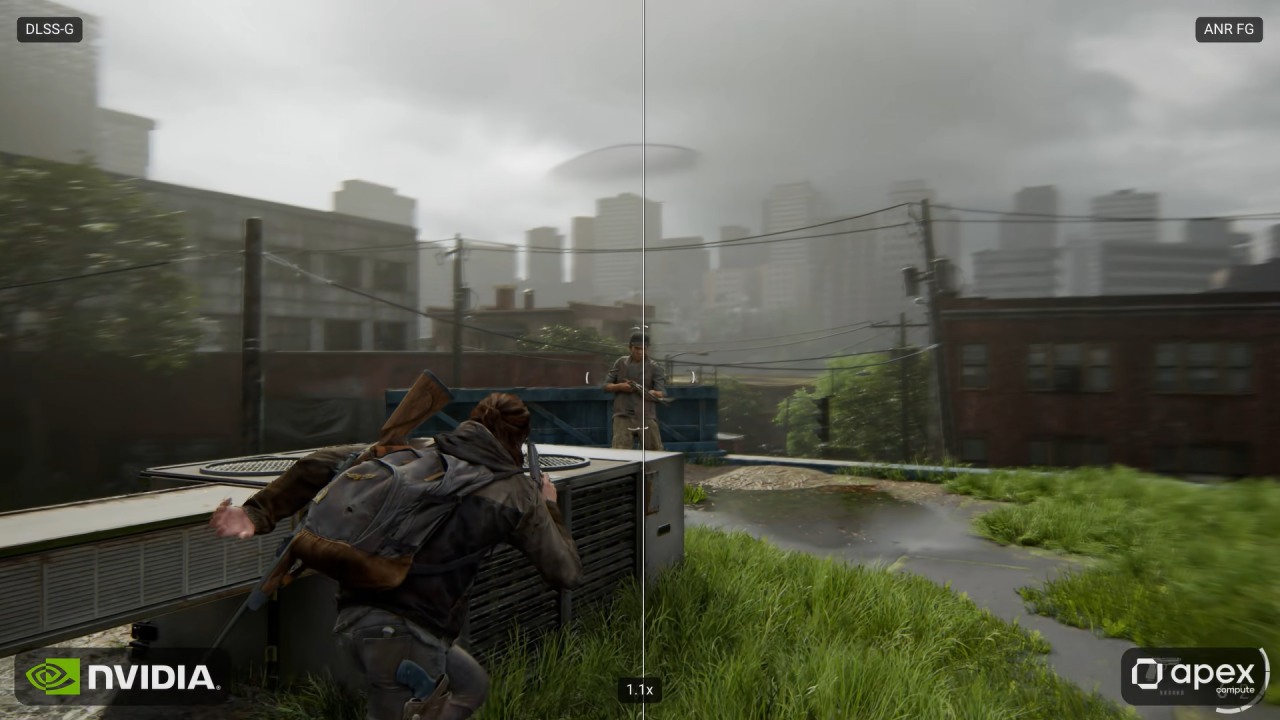
The final image quality comparison used The Last of Us Part II with 4X multi-frame generation, ultra settings, and 4K DLSS Performance mode.
With both technologies, general motion appeared smooth, while quick character movement near the camera created various artifacts. Neither solution was without some of these problems. In some cases, DLSS gave better results, while in others Apex appeared better. But Apex looked slightly less aggressive with artifacts across the whole sequence.
Considering that Apex Neural Rendering is still beta software, it's impressive to get performance similar to proven frame generation solutions. But the current research doesn't provide a solid justification for replacing DLSS with ANR on Nvidia graphics cards right away.

Apex Neural Rendering Works on Intel and AMD GPUs Too
One of the more fascinating things about Apex Neural Rendering is that it can run on different GPU architectures. The concept is based on compute shaders, not specialized machine learning hardware; therefore, it should operate on recent graphics cards from several vendors.
The first cross-vendor test was with an Intel Arc B580, running Cyberpunk 2077 at 1440p, high settings with XeSS Quality mode. With ANR 3X multi-frame creation enabled, the machine averaged 186fps displayed throughout the benchmark run.
Average PC latency was 67ms, which is still rather high. In this setup, OptiScaler sends Reflex inputs via XeLL, which can impact latency results. Despite that limitation, overall frame pacing and frame quality appeared reasonable. Testing also included an AMD Radeon RX 6700, which would otherwise rely on FSR 3 frame generation. The graphics card delivered an average displayed frame rate of 149 fps in Apex.
Latency was considerably higher at 82ms. The sawtooth pattern in the frame-time results also suggested that integration into AMD's rendering pipeline was introducing frame-pacing inconsistencies, particularly with older technology.
These early results show that Apex Neural Rendering can run on Nvidia, Intel, and AMD graphics cards. However, performance and latency still depend heavily on the underlying GPU architecture and software integration.
Apex Neural Rendering Could Change Third-Party Graphics Technology
Apex Neural Rendering is in beta and has plenty of room for improvement. In some cases it competes with current performance results; in others, DLSS is even quicker. Image quality is also mixed, with each technology having strengths that vary by game and scene.
However, the most significant development may not be the frame generation technology itself. Apex Compute is taking a different tack with graphics technology, building an open-source solution that runs on contemporary GPUs from a variety of manufacturers.
Another very important development is the recording tool. It offers a more consistent way to evaluate super-resolution and frame-generation technologies by recording the real inputs rendering algorithms use, removing the irregularities that come with typical gameplay captures.
If Apex Neural Rendering makes it out of beta and keeps improving, it could help foster a more open ecosystem around graphics technology. The harder task will be ensuring third-party solutions can be included in games without requiring extensive developer assistance or complex workarounds.
For now, Apex Neural Rendering has shown that with a little development work, it can deliver a surprisingly competitive alternative to established vendor technology. It will need more comprehensive testing as the program matures, but it's an interesting addition to the PC graphics environment, with its cross-vendor interoperability and additional comparison tools.
FAQ
Q. What is Apex Neural Rendering?
A. Apex Neural Rendering is an open-source graphics technology developed by Apex Compute that includes super resolution, frame generation, and ray reconstruction.
Q. Does Apex Neural Rendering work on AMD and Intel GPUs?
A. Yes. Apex Neural Rendering uses compute shaders, allowing modern GPUs from Nvidia, AMD, and Intel to run its frame generation technology.
Q. Is Apex Neural Rendering faster than Nvidia DLSS?
A. Performance varies by game and settings. Apex was faster in Marvel's Spider-Man Remastered, while DLSS delivered better performance in Cyberpunk 2077 and Crimson Desert.
Q. Is Apex Neural Rendering available for everyone?
A. Apex Neural Rendering's frame generation component is currently available in beta form. Its compatibility and performance may improve as development continues.
Editor, NoobFeed
Gaming Hardware Updates
No Data.