
STAR WARS: Galactic Racer Guide | How to Customize Characters
Here’s a guide on how to customize your character in STAR WARS: Galactic Racer.
Game Guide by Ragib Rawnak on Oct 10, 2026
Character customization is tied directly to the setup phase at the start of a run. You cannot modify your appearance mid-race or while progressing through an active campaign loop.
If you are already in the middle of an ongoing circuit and want a fresh look, you must abandon your current run and return to the start screen.
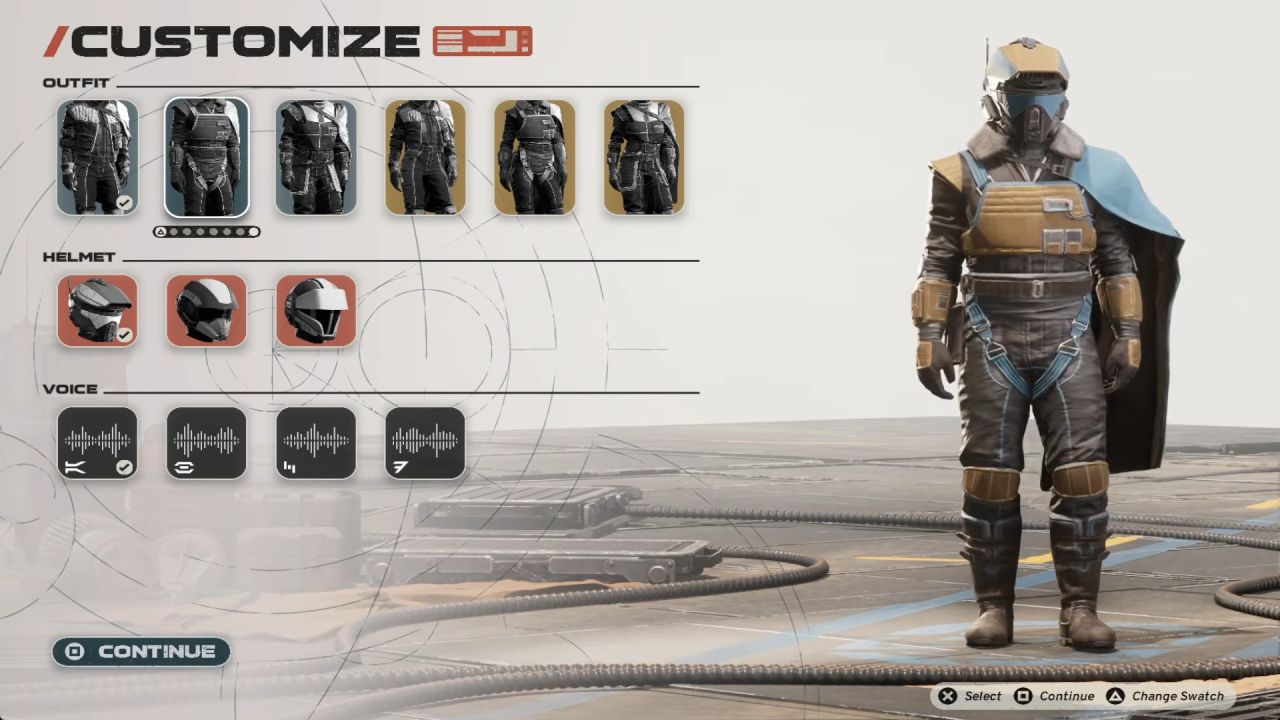
To access the editor, begin a new Tour and select your chosen vehicle. Once you land on the preparation screen where you select your Racer Style and Favors, press F on the keyboard, Square on PlayStation, or X on Xbox.
This hotkey brings up the full pilot customization menu before you hit the track in STAR WARS: Galactic Racer.
Customization Options
The customization suite gives you control over your racer's gear, silhouette, and audio profile. You can mix and match parts across several core categories to match your style.
Outfits and Body Types
The menu features three distinct outfits designed for Body Type A and three tailored for Body Type B. Once you pick an outfit that fits your style, press Triangle on PlayStation or Y on Xbox to cycle through different outfit color palettes in STAR WARS: Galactic Racer.
Helmets and Voice Tuning
Alongside your racing suit, you can choose from three distinct helmets to finish your pilot look. You also have access to four base vocal presets for your character.
If you want a more distinct audio profile, press Triangle on PlayStation or Y on Xbox to adjust the pitch of your selected voice higher or lower in STAR WARS: Galactic Racer.
FAQ
Q. Can I customize your character in the middle of a Tour?
A. No. You can only customize your character during vehicle selection at the beginning of a run. If you want to change your appearance mid-run, you must abandon the current Tour and restart.
Q. Does your character carry over into Multiplayer mode?
A. Yes. Your custom setup for your character acts as your personal avatar in online Multiplayer lobbies alongside other unlockable racers.
Q. How do I change outfit colors and voice pitch?
A. Highlight the outfit or voice option you want, then press Triangle on PlayStation controllers or Y on Xbox controllers to cycle through color swatches and pitch levels.
Also, check our Star Wars: Galactic Racer Review and other guides below:
- STAR WARS: Galactic Racer Beginner’s Guide | Gameplay Tips & Tricks
- STAR WARS: Galactic Racer Guide | How to Get Tuning Points
- STAR WARS: Galactic Racer Guide | How to Farm Credits
- STAR WARS: Galactic Racer Guide | How to Win Head-to-Head Races
- STAR WARS: Galactic Racer Guide | How to Beat Sebulba
- STAR WARS: Galactic Racer Guide | How to Level Up Fast
- STAR WARS: Galactic Racer Guide | How to Unlock Favors
- STAR WARS: Galactic Racer Guide | How to Switch Camera
- STAR WARS: Galactic Racer Guide | How to Do Perfect Landing
- STAR WARS: Galactic Racer Guide | How to Get Backer Rating
- STAR WARS: Galactic Racer Guide | How to Hit Starting Boost
- Star Wars: Galactic Racer Guide | Best Early Game Vehicle
- STAR WARS: Galactic Racer Guide | How to Win Galactic League Championship
- STAR WARS: Galactic Racer Guide | How to Unlock All Racer Styles
- STAR WARS: Galactic Racer Guide | How to Unlock Podracing
- STAR WARS: Galactic Racer Guide | How to Repair Vehicle
- STAR WARS: Galactic Racer Guide | How to Unlock Multiplayer Racers
- STAR WARS: Galactic Racer Guide | How to Unlock Abilities
- STAR WARS: Galactic Racer Guide | How to Upgrade Abilities
- STAR WARS: Galactic Racer Guide | How to Customize Vehicle
Senior Editor, NoobFeed
Latest Articles
No Data.